Introdução
This guide teaches you how to remove and then replace the battery from your Asus Transformer Book T100TAF. This will bring back longevity to the device’s battery life. After replacement, it is advised to calibrate your new battery by fully draining the battery and then charging it, uninterrupted, to 100%.
O que você precisa
-
-
Detach the keyboard from the screen by depressing the silver button the hinge and pulling upwards on the tablet.
 Pergunte ao FixBot
-
-
-
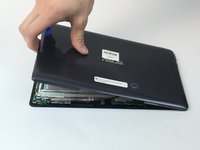
Take the tablet-portion of the device and carefully pry the screen open using either the plastic or metal spudger. Each interior clip needs to be released from the edges.
-
-
-
-
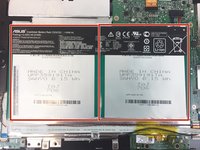
Remove the plastic backing from the device and locate the battery pack.
-
Battery pack
-
-
-
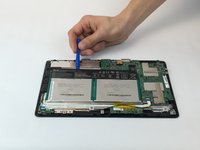
Use the plastic opening tool to pry the battery up from the device. Pry from different sides of the battery to loosen and break the glue that is holding it down.
-




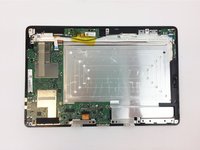
To reassemble your device, follow these instructions in reverse order. After replacement, it is advised to calibrate your new battery by fully draining the battery and then charging it, uninterrupted, to 100%.
Cancelar: não concluí este guia.
6 outras pessoas executaram este guia.

Equipe

USF Tampa, Team 4-3, Passmore Fall 2016 Membro de USF Tampa, Team 4-3, Passmore Fall 2016
USFT-PASSMORE-F16S4G3
4 Membros
Autoria de 10 guias
3Comentários do guia
Bonjour
Remplacement sans problème pour un ASUS T200TA
Par contre il a perdu le paramétrage du Boot.
Ou puis je retrouver ce parametrage??
Bonjour quelqu’un sait comment retirer la batterie d’origine de l’ordinateur (au niveau de la connection)?
Merci
Hi
What glue did you use to secure the new battery?
Thank you
Paul
