Introdução
RAM, or Random Access Memory, is essentially what dictates how many programs you can have open at once on your laptop. In this guide, we will show you how to open up your computer, and replace your RAM "sticks" if you are experiencing problems.
O que você precisa
-
-
-
Place your laptop face down in front of you.
-
Slide the button in the top right corner to the right so that the orange marker is showing.
-
Press the spring loaded latch to release the battery from the computer.
 Pergunte ao FixBot
-
-
-
-
-
-
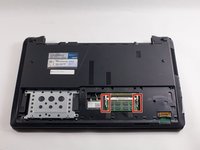
After sliding down the back panel you will see three individual compartments with different components. The one to the far right is the RAM.
-
-
-
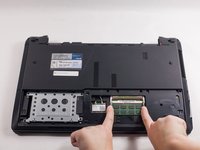
To remove the RAM stick, locate the silver tabs holding the stick in place.
-
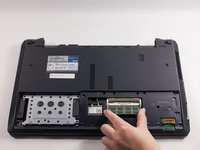
Move the silver tabs so that the detents are no longer holding the RAM in place. Once you've done this, the RAM will pop up and out.
-
-


To reassemble your device, follow these instructions in reverse order.
Cancelar: não concluí este guia.
Uma outra pessoa concluiu este guia.

Equipe

UMass Dartmouth, Team 1-1, Catania Fall 2016 Membro de UMass Dartmouth, Team 1-1, Catania Fall 2016
UMASSD-CATANIA-F16S1G1
3 Membros
Autoria de 48 guias
