Introdução
The battery is located on the bottom of the laptop. Before starting the guide, make sure the laptop's charger is not plugged in. No tools are needed for this guide.
-
-
Start by placing the laptop upside-down on a flat surface.
-
Find the two clips on the back portion of the laptop.
 Pergunte ao FixBot
-
-
-
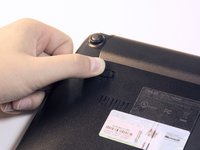
Using your finger, push the clip labeled with a "1" on the laptop from the lock position to unlock position.
-
-
-
-
Using your finger, push and hold the pin indicated by a "2" on the laptop from the lock to unlock position.
-
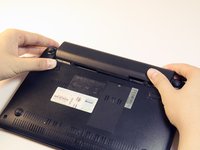
While holding this pin in the unlock position, use your other hand to pull the battery horizontally away from the laptop.
-
-
-
Using both hands, pull the battery horizontally away from the laptop.
-



To reassemble your device, follow these instructions in reverse order.
Cancelar: não concluí este guia.
2 outras pessoas executaram este guia.

Equipe

Cal Poly, Team 13-32, Maness Spring 2014 Membro de Cal Poly, Team 13-32, Maness Spring 2014
CPSU-MANESS-S14S13G32
5 Membros
Autoria de 5 guias
