Ir para o conteúdo principal
Participe da comunidade de reparos - Criar conta

Astak Mole Antenna Replacement

O que você precisa

    1. Astak Mole Antenna Replacement, Lower Case: passo 1, imagem 1 %32
      • Remove the four bottom tabs in order to access the bottom screws.

      Pergunte ao FixBot

      Comentar

    2. Astak Mole Antenna Replacement: passo 2, imagem 1 %32
      • Remove all four 14 mm Phillips #1 screws.

      Pergunte ao FixBot

      Comentar

    3. Astak Mole Antenna Replacement: passo 3, imagem 1 %32
      • Remove the SD card.

      Pergunte ao FixBot

      Comentar

    4. Astak Mole Antenna Replacement: passo 4, imagem 1 %32
      • Pry up the motherboard on the four points using a spudger.

      • The regular black nylon spudger should be used whenever possible, especially around sensitive internal components.

      Pergunte ao FixBot

      Comentar

    5. Astak Mole Antenna Replacement: passo 5, imagem 1 %32
      • Gently pull back the motherboard to expose many of the component's wired connections.

      Pergunte ao FixBot

      Comentar

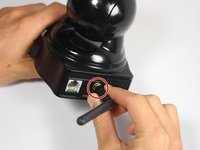
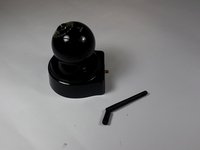
    1. Astak Mole Antenna Replacement, Antenna: passo 6, imagem 1 %32 Astak Mole Antenna Replacement, Antenna: passo 6, imagem 2 %32
      • Unscrew the antenna in a counter-clockwise rotation.

      Pergunte ao FixBot

      Comentar

    2. Astak Mole Antenna Replacement: passo 7, imagem 1 %32
      • Take out the screw holding the antenna wire with the PH1 size Phillips head bit.

      • Screw length: 5.3mm

      Pergunte ao FixBot

      Comentar

    3. Astak Mole Antenna Replacement: passo 8, imagem 1 %32
      • Gently pry open the circuit board attached to the antenna wire using a metal spudger.

      • The regular black nylon spudger should be used whenever possible, especially around sensitive internal components.

      Pergunte ao FixBot

      Comentar

    4. Astak Mole Antenna Replacement: passo 9, imagem 1 %32
      • Remove the antenna female end from the motherboard.

      Pergunte ao FixBot

      Comentar

Conclusão

To reassemble your device, follow these instructions in reverse order.

Cancelar: não concluí este guia.

Uma outra pessoa concluiu este guia.

Equipe

USF Tampa, Team 2-2, Blackwell Fall 2016 Membro de USF Tampa, Team 2-2, Blackwell Fall 2016

USFT-BLACKWELL-F16S2G2

4 Membros

Autoria de 17 guias

0Comentários do guia

Comentar

Visualizações:

Últimas 24 horas: 1

Últimos 7 dias: 8

Últimos 30 dias: 31

Ao todo: 933