Essa tradução foi gerada por um programa e ainda não foi revisada por uma pessoa. Falas essa língua? Dá uma olhada.
Introdução
Este guia mostrará como abrir corretamente o controle remoto da sua Apple TV 4K e acessar a placa lógica para substituição.
O que você precisa
-
-
-
Aqueça o iOpener de acordo com as instruções do fabricante.
-
Coloque-o sobre a face do controle remoto para amolecer o adesivo sob o vidro.
 Pergunte ao FixBot
-
-
-
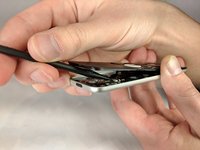
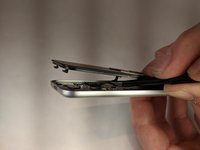
Com uma espátula, levante cuidadosamente a parte frontal do controle remoto, começando pela base e seguindo até o topo.
-
-
-
Empurre a parte frontal para a frente para soltar os clipes de plástico no topo do controle remoto.
-
-
-
Ferramenta utilizada neste passo:Tweezers$4.99
-
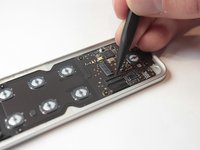
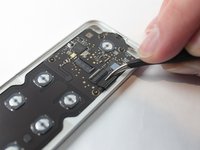
Desconecte o conector que une a tela tátil e a placa lógica.
-
Em seguida, use pinça para soltar o conector que une a tela tátil à placa lógica.
-
-
-
Levante a trava que prende o conector da bateria.
-
Use uma pinça para desconectar o conector da bateria.
-
-
-
Remova os seguintes parafusos usando uma chave Torx T3:
-
Oito parafusos de 2 mm
-
-
-
Usando uma espátula, remova cuidadosamente a placa lógica da carcaça do controle remoto.
-
-






Para a remontagem de seu dispositivo, siga estas instruções na ordem inversa.
Cancelar: não concluí este guia.
4 outras pessoas executaram este guia.

Equipe

UW Stout, Team S6-G3, Ogden Fall 2018 Membro de UW Stout, Team S6-G3, Ogden Fall 2018
UWSTOUT-OGDEN-F18S6G3
4 Membros
Autoria de 39 guias
2Comentários do guia
Have you ever successfully reconnected the ribbon cable after disassembly? It seems nearly impossible to do by hand…
I can’t find replacement adhesive that fits. How are people getting this thing to stick back together when you’re done??
