Introdução
Are some of the buttons on your remote unresponsive? Use this guide to replace the button panel on the remote control.
Make sure to keep the removed screws inside a container, or on a magnetic mat so they don't get misplaced.
O que você precisa
-
-
Turn the remote control over to show its back and place your index finger in the tab. Squeeze gently to open the battery cover.
-
Lift the battery cover up to expose the batteries.
 Pergunte ao FixBot
-
-
-
Use your index finger to push the battery back and lift up to remove the battery.
-
Repeat the procedure for the second battery.
-
-
-
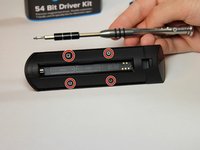
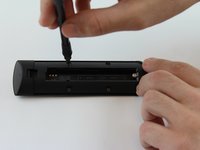
Locate the four 3.6 mm Phillips J#00 screws found under the back panel of the remote control and remove them.
-
-
-
-
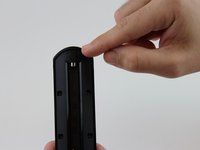
Locate the bottom of the remote control.
-
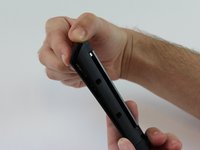
Place your thumb on the bottom part of the remote. Apply pressure as shown in the picture to release the back panel from the front of the case.
-
-
-
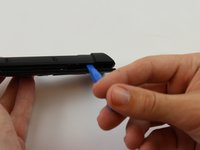
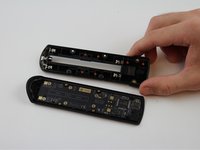
Insert a plastic opening tool in the gap and apply some force to disconnect the two pieces away from each other.
-
-
-
Unscrew the seven 2.4 mm Phillips J#00 screws that connect the motherboard to the case.
-
-
-
Place the plastic opening tool or your fingernail in the gap at the top end and lift the motherboard.
-
-
-
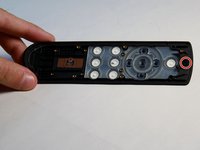
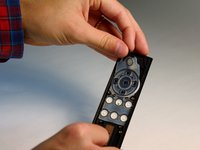
Locate the black plastic tab at the top end of the button panel, grab it with your fingers and pull back to separate the button panel from the remote control's case.
-








To reassemble your device, follow these instructions in reverse order.
Cancelar: não concluí este guia.
5 outras pessoas executaram este guia.

Equipe

USF Tampa, Team 16-3, Wollert Fall 2015 Membro de USF Tampa, Team 16-3, Wollert Fall 2015
USFT-WOLLERT-F15S16G3
4 Membros
Autoria de 16 guias
3Comentários do guia
The guide is wrong on step 7, there are 2 more hidden screws behind the plastic curved cover on top. If you get those out, you don't have to apply force to open. With step 7 you brake the metal nuts out of their place.
I’m also not quite convinced about step 5 - the metal nuts are also broken out there, and I can’t seem to get them back in, leaving the case 1mm open round the top.
I too popped it open with force and found the 2 nuts pulled out of their sockets. I was able to remove the screws from the case, then re-insert the screws into the nuts and punch them (hard) back into the little socket holes. They stuck fast, and didn’t spin when I reassembled the remote.
