Ir para o conteúdo principal
Participe da comunidade de reparos - Criar conta

Altec Lansing BoomJacket Power Button Replacement

O que você precisa

  1. Altec Lansing BoomJacket Power Button Replacement, Case Removal: passo 1, imagem 1 %32
    • Using your hands, remove the pegs (4+4) from the front and back of the speaker.

    Pergunte ao FixBot
  2. Altec Lansing BoomJacket Power Button Replacement: passo 2, imagem 1 %32
    • Remove the outer black rubber housing of the speaker.

    Pergunte ao FixBot
  3. Altec Lansing BoomJacket Power Button Replacement: passo 3, imagem 1 %32
    • Remove the inner blue rubber housing from the speaker.

    Pergunte ao FixBot
  4. Altec Lansing BoomJacket Power Button Replacement: passo 4, imagem 1 %32
    • Pull out the two black wire meshes using a metal spudger.

    • Be careful not to damage the metal casing.

    Pergunte ao FixBot
  5. Altec Lansing BoomJacket Power Button Replacement: passo 5, imagem 1 %32 Altec Lansing BoomJacket Power Button Replacement: passo 5, imagem 2 %32
    Ferramenta utilizada neste passo:
    Tweezers
    $4.99
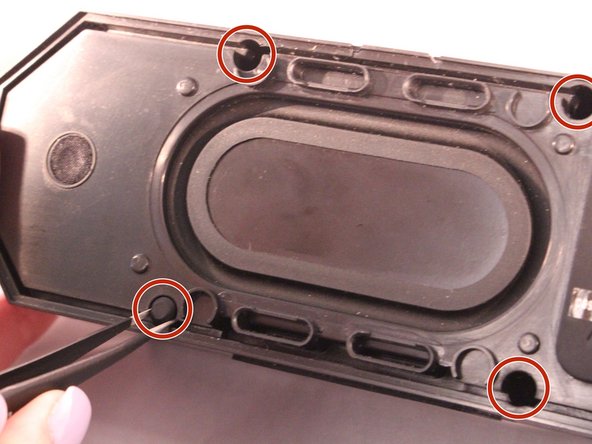
    • Using tweezers remove the rubber stoppers (4 at the back + 2 at the front).

    Pergunte ao FixBot
  6. Altec Lansing BoomJacket Power Button Replacement: passo 6, imagem 1 %32
    • Using the size PH1 screwdriver remove the screws exposed from the rubber stoppers (4 + 2).

    Pergunte ao FixBot
  7. Altec Lansing BoomJacket Power Button Replacement: passo 7, imagem 1 %32
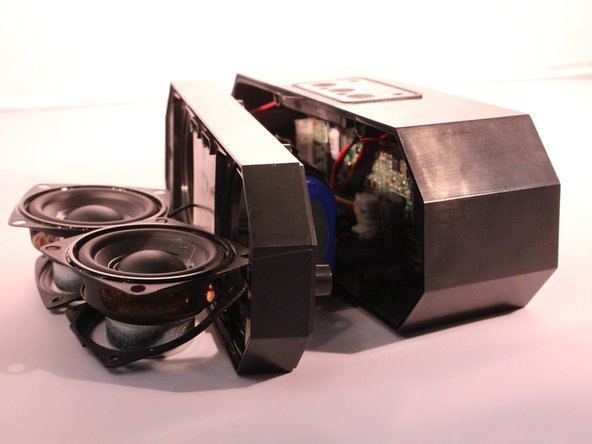
    • Pull the case apart and you will be able to see all the components inside the speaker.

    Pergunte ao FixBot
  8. Altec Lansing BoomJacket Power Button Replacement, Power Button: passo 8, imagem 1 %32
    • The battery will be sitting right behind the speakers when the case is open.

    Pergunte ao FixBot
  9. Altec Lansing BoomJacket Power Button Replacement: passo 9, imagem 1 %32 Altec Lansing BoomJacket Power Button Replacement: passo 9, imagem 2 %32
    • Unplug and disconnect the battery from the motherboard.

    Pergunte ao FixBot
  10. Altec Lansing BoomJacket Power Button Replacement: passo 10, imagem 1 %32
    • Using a size PH1 screwdriver, remove the two screws.

    Pergunte ao FixBot
  11. Altec Lansing BoomJacket Power Button Replacement: passo 11, imagem 1 %32 Altec Lansing BoomJacket Power Button Replacement: passo 11, imagem 2 %32
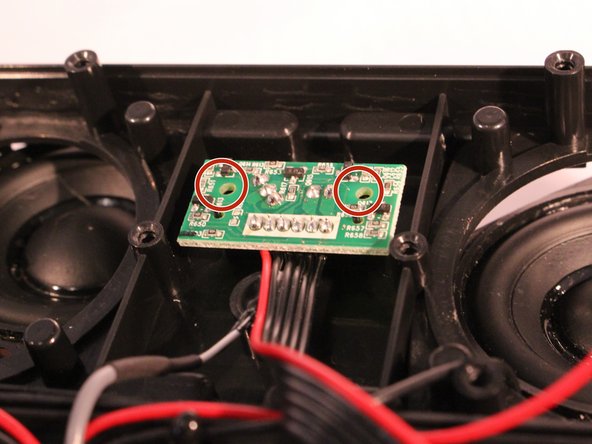
    • You will now see the motherboard for the power button.

    • Remove the 2 screws holding the motherboard into place.

    Pergunte ao FixBot
  12. Altec Lansing BoomJacket Power Button Replacement: passo 12, imagem 1 %32
    • Pick up the motherboard and take it out of the slot.

    Pergunte ao FixBot
  13. Altec Lansing BoomJacket Power Button Replacement: passo 13, imagem 1 %32
    • Disconnect the power button motherboard from the speaker motherboard.

    Pergunte ao FixBot
Conclusão

To reassemble your device, follow these instructions in reverse order.

8 outras pessoas executaram este guia.

1Comentário do guia

Current speaker won’t turn on even though charging light looks all good so came across these instructions.

Thinking it’s the power button on my speaker that’s the issue.

Assuming these instructions are assuming you are replacing the power button motherboard? Where could I source one?

Cat Moure - Responder Compartilhar

Comentar

Visualizações:

Últimas 24 horas: 1

Últimos 7 dias: 5

Últimos 30 dias: 62

Ao todo: 21,290