Introdução
If resetting your Alienware 15 R2 drivers fails to fix internet connectivity issues, you might need to replace the Wi-Fi card. Make sure the Wi-Fi card you are using as a replacement is compatible with the laptop. When working with computers, always make sure to unplug your computer and ground yourself before reaching inner components so you don’t accidentally release an electrical charge into the sensitive technology. The discharge could potentially damage your computer’s internals.
O que você precisa
-
-
-
Place laptop upside down with the hinge facing you, then remove the two 9mm Phillips #0 screws located in the center of the rear panel. Remove the rear panel by using the iFixit opening tool to separate it from the back of the laptop.
 Pergunte ao FixBot
-
-
-
-
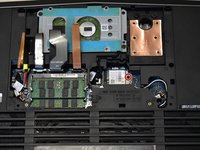
Remove the 6.0 mm Phillips #0 screw on the Wifi card. Disconnect the white and black wires, then slide the card out.
-
-



To reassemble your device, follow these instructions in reverse order.

Equipe

Western Carolina University, Team S1-G2, Virtue Fall 2019 Membro de Western Carolina University, Team S1-G2, Virtue Fall 2019
WCU-VIRTUE-F19S1G2
4 Membros
Autoria de 7 guias
