Introdução
If your battery life doesn't last like it used to then this guide will show you how to take out your Alcatel Pop 4 Plus Battery for replacement with out damaging phone. It a simple process of removing the outside cover, secondary cover, and then swapping out the battery for a new one.
O que você precisa
-
-
Remove the back cover by sliding your fingernail in the grove around the edge of the phone and prying it off.
 Pergunte ao FixBot
-
-
-
-
Use the flat end of the spudger, or your fingernail, to pry off the mid-frame.
-
-
-
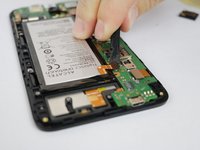
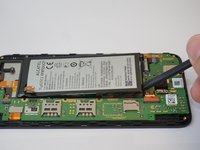
Use the flat end of the spudger disconnect the battery from the motherboard.
-
Use the flat end of the spudger tool to pry out the battery.
-


To reassemble your device, follow these instructions in reverse order.
Cancelar: não concluí este guia.
Uma outra pessoa concluiu este guia.

Equipe

USF Tampa, Team S20-G6, Passmore Spring 2018 Membro de USF Tampa, Team S20-G6, Passmore Spring 2018
USFT-PASSMORE-S18S20G6
4 Membros
Autoria de 12 guias
