Introdução
This guide will show how to replace the battery in the device. The battery may need to be replaced if it will not charge, or if it keeps dying rapidly. There should be no problems when replacing the battery. The tools that will be needed for replacing the battery are a plastic opening tool and the Phillips #00 screwdriver.
O que você precisa
-
-
-
To separate the screen from the back panel, run the plastic opening tool along the outer edge of the device.
 Pergunte ao FixBot
-
-
-
-
-
-
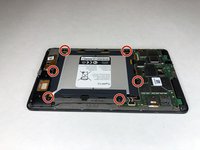
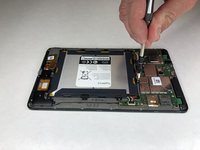
Use a Phillips #00 screwdriver to remove the six 2.5 mm screws located around the perimeter of the battery.
-
-
-
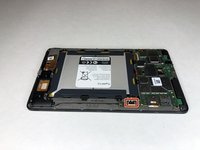
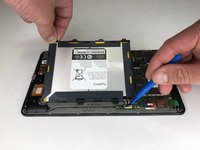
Use the plastic opening tool to disconnect the black battery connector.
-
Gently lift the battery out of the device.
-
-




To reassemble your device, follow these instructions in reverse order.
Cancelar: não concluí este guia.
2 outras pessoas executaram este guia.

Equipe

University of Alabama, Team S1-G3, Bedsole Spring 2019 Membro de University of Alabama, Team S1-G3, Bedsole Spring 2019
UA-BEDSOLE-S19S1G3
4 Membros
Autoria de 6 guias
