Ir para o conteúdo principal
Participe da comunidade de reparos - Criar conta

ASUS X44H-BBR4 Battery Replacement

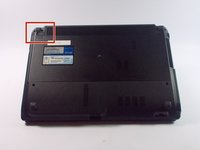
  1. ASUS X44H-BBR4 Battery Replacement, Battery: passo 1, imagem 1 %32 ASUS X44H-BBR4 Battery Replacement, Battery: passo 1, imagem 2 %32
    • Flip the device over.

    Pergunte ao FixBot
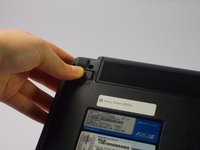
  2. ASUS X44H-BBR4 Battery Replacement: passo 2, imagem 1 %32 ASUS X44H-BBR4 Battery Replacement: passo 2, imagem 2 %32 ASUS X44H-BBR4 Battery Replacement: passo 2, imagem 3 %32
    • Slide the right lock button to the unlock position.

    • After it is unlocked, a red line will be visible.

    Pergunte ao FixBot
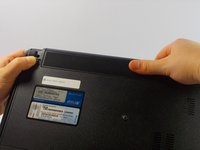
  3. ASUS X44H-BBR4 Battery Replacement: passo 3, imagem 1 %32 ASUS X44H-BBR4 Battery Replacement: passo 3, imagem 2 %32
    • Slide the left lock button into the unlock position and hold.

    Pergunte ao FixBot
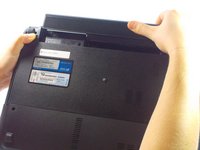
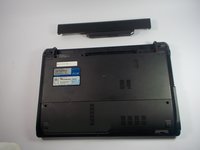
  4. ASUS X44H-BBR4 Battery Replacement: passo 4, imagem 1 %32 ASUS X44H-BBR4 Battery Replacement: passo 4, imagem 2 %32 ASUS X44H-BBR4 Battery Replacement: passo 4, imagem 3 %32
    • While holding the left lock button in the unlock position, push the battery from the center away from you.

    Pergunte ao FixBot
Conclusão

To reassemble your device, follow these instructions in reverse order.

2 outras pessoas executaram este guia.

Kelly Merlo

Membro desde: 10/14/15

500 Reputação

Autoria de 2 guias

Equipe

UMass Dartmouth, Team 4-3, Catania Fall 2015 Membro de UMass Dartmouth, Team 4-3, Catania Fall 2015

UMASSD-CATANIA-F15S4G3

4 Membros

Autoria de 8 guias

0Comentários do guia

Comentar

Visualizações:

Últimas 24 horas: 0

Últimos 7 dias: 3

Últimos 30 dias: 47

Ao todo: 1,201