Ir para o conteúdo principal
Participe da comunidade de reparos - Criar conta

3DR Solo Battery Replacement

    1. 3DR Solo Battery Replacement, Battery: passo 1, imagem 1 %32
      • Lay the drone down on its legs so that the power button is facing up.

      Pergunte ao FixBot

      Comentar

    2. 3DR Solo Battery Replacement: passo 2, imagem 1 %32
      • Locate the release button on top of the battery.

      Pergunte ao FixBot

      Comentar

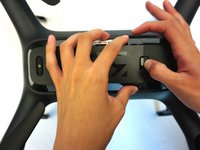
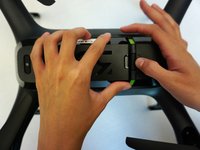
    3. 3DR Solo Battery Replacement: passo 3, imagem 1 %32 3DR Solo Battery Replacement: passo 3, imagem 2 %32
      • With one finger, push down on the release button and with the other, grip the battery and slide it to the left.

      Pergunte ao FixBot

      Comentar

    4. 3DR Solo Battery Replacement: passo 4, imagem 1 %32
      • Lift the battery from the drone.

      Pergunte ao FixBot

      Comentar

Conclusão

To reassemble your device, follow these instructions in reverse order.

Cancelar: não concluí este guia.

Uma outra pessoa concluiu este guia.

Lauren Hays

Membro desde: 09/11/17

222 Reputação

Autoria de 2 guias

Equipe

CSU Fullerton, Team S2-G3, Bruce Fall 2017 Membro de CSU Fullerton, Team S2-G3, Bruce Fall 2017

CSUF-BRUCE-F17S2G3

4 Membros

Autoria de 5 guias

0Comentários do guia

Comentar

Visualizações:

Últimas 24 horas: 1

Últimos 7 dias: 5

Últimos 30 dias: 33

Ao todo: 2,218