Ir para o conteúdo principal

The IdeaPad Flex 5 is a mid-range laptop launched on May 20, 2020. It has an AMD 5000 series processor with integrated graphics, 8-16 GB of soldered memory, and two M.2 slots (one for an SSD, one for a WIFI card).

Can't remove lower case, also the manual seems wrong

i'm trying to open my laptop to clean the fan, but can't open the lower case.

i'm using this manual

Lenovo IdeaPad 5 (14″, 05) Hardware Meaintenance And Service Manual

that should be the right one as the model is IdeaPad 5 14ALC05 82LM

following the manual first of all it tells to remove 9 screws when my laptop has only 7 (the other two aren't missing, there's 2 fewer holes than described).

anyway i remove every screw, pop all the clips on the 4 sides and now the borders are free to flex upwards and move around a bit, but there seems to be something holding the cover in place, from roughly the center.

Nothing like this is mentioned in the manual and in every tutorial video i looked up the cover just lifts off without effort after popping the clips.

has anyone encountered the same problem?

Respondido! Ver a resposta Também tenho esse problema

Esta é uma boa pergunta?

Pontuação 0
3 comentários

What about screw hidden under stickers, rubber plugs

por

there's no stickers left on the bottom, also the places where the feet are placed can move around, so there doesn't seem to be a hidden screw under a foot

por

Can you post a picture of the bottom of the laptop please?

por

Adicionar um comentário

2 respostas

Solução escolhida

thank you everyone,

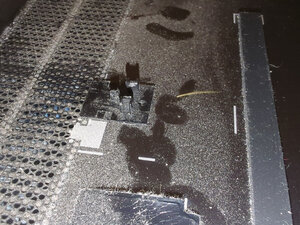
i figured it out, the answer was to use more force, and helping myself with a ruler.

in my laptop there was an extra latch in the middle that isn't clearly mentioned in the manual and takes a surprising amount of strength to pull open

the part number for the cover is 5CB0Y88536

Block Image

Esta resposta foi útil?

Pontuação 0

1 comentário:

That looks broken

por

Adicionar um comentário
Pergunta mais útil

Hi @buci

Looking at the parts list for the 82LM laptop, it shows that there are 6 lower case covers available - click on Select Commodity → Covers (6)

The interesting thing is when you search online for the part numbers shown in the list, all the plastic covers have 9 holes and the Aluminium covers have only 7. ( I assume that's what the PL and AL code in the part's name means)

Also the parts list shows covers for different Lenovo Ideapad 5 14 models i.e. 81YH = IdeaPad 5 14iil05 & 82FE = IdeaPad 5 14itl05 and not the 82LM model which it supposedly should

Here's a video that shows how to remove an Aluminium cover (only 7 screws - part number 5CB0Y88536) which is listed in the parts list for the laptop but is for an 81YH but there doesn't seem to be anything holding it once the screws have been removed and it is unclipped.

Perhaps try entering the laptop's serial number in the parts page search box where it states Enter the Serial number and check what part number it shows for the lower case cover, and then search online for the part number only to find images of the cover and zoom in to count the screw holes. If there are any 7 hole covers, they may state what laptop model they're compatible with. Search for videos showing how to remove the cover for that model and see how it's done.

I realize that this doesn't help you but at least it may help to clarify it a bit. Once you get the cover off, the part number should be on the cover somewhere so that you can see of it is listed on not.

Esta resposta foi útil?

Pontuação 1

1 comentário:

there was an extra latch i didn't see right in the middle of the cover, looking at it better the same thing is also on the replacement covers in the lenovo store, but i don't think i've seen anyone struggle with it in a video tutorial

por

Adicionar um comentário

Adicionar a sua resposta

buci será eternamente grato(a).
Visualizações:

Últimas 24 horas: 0

Últimos 7 dias: 0

Últimos 30 dias: 5

Ao todo: 86