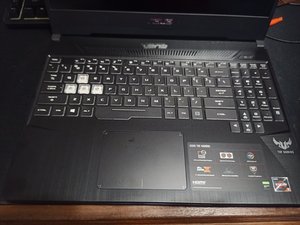
usb port can't detect?
all of my the usb slot doesn't work and can't detect at all.
Esta é uma boa pergunta?
Pontuação
0

all of my the usb slot doesn't work and can't detect at all.
Esta é uma boa pergunta?

Rep: 539,8 mil
 11
11
 411
411
 1,6 mil
Hi @kukuhiwan
Check if power is being supplied by the USB ports i.e. plug in a mobile phone and check if it is charging or plug in a USB mouse and check if the laser lens turns on.
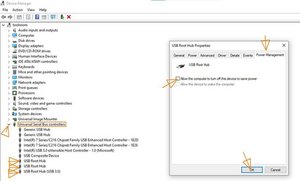
If there's no power being supplied by the USB ports, check that the Allow the computer to turn off this device setting in Device Manager is unchecked.
Go to Device Manager > Universal Serial Bus Controllers > right click on USB Root Hub > Properties > Power Management.
Do this for all the USB Root Hubs listed.
If the settings were enabled in Root Hub and now you have disabled all of them, restart the laptop for the change to come into effect
To get to Device Manager in Win10/11 press the Win key + x key (both keys together) and click on the Device Manager link.
Here's an image that shows what it should look like. The hardware shown in the Device Manager image may not match your model but the USB controller settings are all the same.
(click on image)
Esta resposta foi útil?
Últimas 24 horas: 0
Últimos 7 dias: 7
Últimos 30 dias: 39
Ao todo: 372

1 comentário
Hi Kukuh!
Did this issue just happen suddenly? Or did you do anything physical to the ports?
por Teamin Park