

 8
8  4
4 How to factory reset an Apple Watch 7000 without passcode
Hi community,
I recently bought an Apple Watch 7000 with a broken screen off ebay and managed to get it working again, but I found out that the watch is locked with a passcode.
I’ve tried the method illustrated at Restore Apple Watch to Factory Settings (Without Passcode), but no matter where I press on the screen after holding the power button, no erase content and settings screen comes on.
Is there something that I’m doing wrong, or maybe something different I could do?
Kind Regards,
Carpe Diem
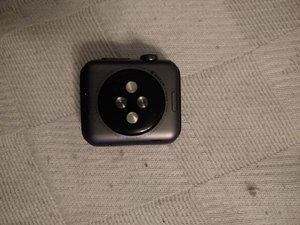
Edit: I’ve added some images of the backside of the watch


Esta é uma boa pergunta?
Pontuação
1

 9
9 

You'll need to first figure out which model you have. The 'Apple Watch 7000' is not the model ID the 7000 is the version of aluminum the case is made with!
Review this Apple T/N to ID your watch Identify your Apple Watch Clearly you'll need to use the pictures as you can't get to the watches info.
por DanJ
@danj Thanks for the quick reply. I've added some photos and I do believe it is a series 1.
por Minas Mayth
I found a solution to the problem, go into the slider menu that has power off, (optinal medical id), and emergancy. hold down the power off slider, but dont move it. while holding down the slider, press the digital crown (the spinny thing), and it should come up with the reset device button. if this doesn't work, try it again, exept move your finger slightly more onto the slider. this should work.
por Benjamin Pajamaa