Ir para o conteúdo principal

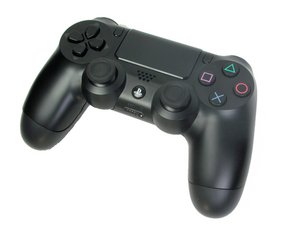
Controle PS4 modelo CUH-ZCT1. Lançado em novembro de 2013 pela Sony Computer Entertainment, este controlador de seis eixos com bateria de íon de lítio de 3,7 V é simples de reparar. (NOTA: O guia de desmontagem NÃO é para este modelo)

How do I fix my controller stuck on G on keyboard?

So basically I got this pre owned controller and when I go to type it glitches and stays on the G button, no matter what I do. I tested out the controller in-game and again, it spams certain inputs. I have bought a cheap wired controller and it appears that the problem was the touchpad AND the L3 and R3 buttons. So my question is how do I fix this and is there an option rather than purchasing a controller. Also is there a way to plug a headphone jack into the PS4 if there is no way to fix.

Responder a esta pergunta Também tenho esse problema

Esta é uma boa pergunta?

Pontuação 3

Adicionar um comentário

4 respostas

Pergunta mais útil

Repairing the controller in this case sounds impractical. I would just buy a new controller.

There is a reset button on the back of the PS4 controller you could try.

Block Image

There is no way to connect headphones to a PS4 directly, only through the controller.

Esta resposta foi útil?

Pontuação 1

1 comentário:

you can absolutely plug a mic and headphone in the usb plug of your ps4 and a adapter that you plug them in , thats i plug my headset with my mic

por

Adicionar um comentário

i think you have to get your controller fixed or try to fix it your self and you would have to open the whole controller

Esta resposta foi útil?

Pontuação 0
Adicionar um comentário

Restarting the PS4 usually fixes this issue, as rebooting any device fixes most issues. Do note that the bug will reappear after a while. I have this same exact issue with a controller I brought a month ago and restarting the device is the cheap way to do it. If that doesn’t work, reset the PS4 controller, which is a small button underneath the L2 button. You might need a paperclip or a mechanical pencil to press this button.

Esta resposta foi útil?

Pontuação 0
Adicionar um comentário

I did all of this and none of it worked. I tried forgetting and reconnecting the controller restating the game and updating it.

Esta resposta foi útil?

Pontuação 0
Adicionar um comentário

Adicionar a sua resposta

Josef Baydemir será eternamente grato(a).
Visualizações:

Últimas 24 horas: 0

Últimos 7 dias: 11

Últimos 30 dias: 48

Ao todo: 13,116
