Ir para o conteúdo principal
Participe da comunidade de reparos - Criar conta

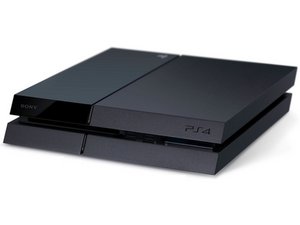
Um videogame de tv fabricado pela Sony Computer Entertainment, também conhecido como PS4. Primeiramente anunciado em 20 de fevereiro de 2013 e lançado em 15 de novembro de 2013.

Ps4 cannot start... Insert USB... Tried everything

Power went out. Now Ps4 displays the following message: Ps4 Cannot Start. Attach Usb with 5.05 software or more.

Already tried that several times with the right file (900+mb) doesn't work. Tried removing HDD and checking it's functionality... It works perfectly.. I formatted it manually on PC and tried again still didn't work. What can I do to fix it?

Some guy in a PS store told me that there's a problem with the NAND which I didn't understand and said he couldn't fix it.

Responder a esta pergunta Também tenho esse problema

Esta é uma boa pergunta?

Pontuação 3
4 comentários

no you.........

por

What I found worked was when its turned off get it into safe mode (pressing the the power button when hear the first beep keep holding until I hear a second) this opens safe mode menu. From here I selected update software which took me to another menu with 3 ways to do so which 1 was by havingused a pc to out the software on usb there's was a second option (can't recall what that one was and the 3rd was update by internet which is what I selected... From here it came saying with the usual update software screen you get when doing them normally... 3 mins later came up sayin system software of the PS4 has be updated PS4 will restart and with the new system software update like normal.

por

Just wants you to update yourself to thee P5!!! Never ever have I had to update or a use a USB for my PlayStations since the beginning of PlayStation!!.. is basically get the PS5 or die

por

Adicionar um comentário

11 respostas

Pergunta mais útil

Are you using a usb stick formatted fat32?

Is it in the correct folder /PS4/UPDATE/PS4UPDATE.PUP?

Have you tried using another USB Stick/HardDisk?

Esta resposta foi útil?

Pontuação 3

3 comentários:

It worked

Thank you

por

This works! Thanks so much, your information saved me from insanity!

por

Does not work, the PS4 does not recognize PS4UPDATE.PUP, no matter what I do. Seems my PS4 is basically a write-off.

por

Adicionar um comentário

This just happened to my son's ps4 and believe it or Not, it was the USB cord was bad!! We received the SAME message and then it wouldn't even turn on... just a white stripe! Was about to take it it with last hope of get getting it serviced when I attempted to use that cord to connect my computer to the tv and it wouldn't work- I switched it out for the cable box NEW USB and that worked.. a few hours later it dawned on me that could have been the issue with the ps4! I hooked it up and it turned right on!! No problems. Sometimes the answer is too simple to see. Hope this fix gets spread :)

Esta resposta foi útil?

Pontuação 1
Adicionar um comentário

Follow this guide - PS4™ Complete System Software File:

https://www.playstation.com/en-us/suppor...

Scroll down and follow the instructions on that page where the bolded heading specified above. If you follow the instructions to the T it should work.

Unless there is a hardware problem which is usually either a faulty hard drive or non-functional blu-ray drive (can be caused by drive board or circuitry of drive controller on board depending on model).

Esta resposta foi útil?

Pontuação 1
Adicionar um comentário

Losing my mind… Did both files for PUP update and Hard reset. No errors.. Finally got a hard reset to work started reloading life into clean drive. The PS went into sleep mode and woke up doing it again.

Cannot start PS4 and asking for update 7.51 on a jump drive again. Not working.. now safe mode is locked into only highlighting option 7 and cannot navigate. I enter for the option and it's asking only for USB and stuck..

Removed hard drive to check startup for different error so seems the SSD is functioning. Still thinking may need to buy complete new SSD instead of sending it off.

Esta resposta foi útil?

Pontuação 1

1 comentário:

We just had the same problem and we solved it by plugging the PS4 directly into a wall socket with no other cords sharing the outlet.

por

Adicionar um comentário

Looks like your PS4 is looking for the initialisation software. There are two options for downloading firmware from the PlayStation support website. One is a firmware update and the other is the full firmware package, both are called PS4UPDATE.PUP. You need the full firmware file which is a much larger file than the update, around 2GB I think. Beware though as this firmware performs a full reset of the PS4 which means it will wipe everything off the hard drive.

Esta resposta foi útil?

Pontuação 0
Adicionar um comentário

Hi there. i have exactly the same problem. can someone help? Many thanks

Esta resposta foi útil?

Pontuação 0

1 comentário:

We just had the same problem and we solved it by plugging the PS4 directly into a wall socket with no other cords sharing the outlet.

por

Adicionar um comentário

ya probé de todas las opciones que te da el modo seguro y continua la pantalla “Cannot sart the PS4.

Ya probé que el disco duro este en buenas condiciones .

- Solo al iniciar el PS4. se tarda como 50seg. en arrancar, me da vídeo y después me manda mismo mensaje de:

Cannot sart the PS4. y que actualize la version 7.00 por USB . la cual ya baje la actualización la ejecuto y carga una barra blanca al 100% y al reiniciar regresa a la misma pantalla de: Cannot sart the PS4. y es un circulo que no termina y no inicia la consola. ayuda

Esta resposta foi útil?

Pontuação 0
Adicionar um comentário

I tried everything to reinstall my ps4 an update it to 7.50 an it still not

Esta resposta foi útil?

Pontuação 0

3 comentários:

I'm thinking it might be an issue with the SSD hardware, but I haven't tried option #7 initialize ps4 (Reinstall System Software) yet. I will try that and get back to you. Wish me luck.

por

Option #7 worked. Reinstalled system software, but I had to remove my external USB hard drive and cleaned the USB ports first with compressed air. One note: While testing party chat,.. multiple error messages (3-4) occurred. Had to abandon the test due to time constraints. However, the system no longer loops in safe mode.

por

We just had the same problem and we solved it by plugging the PS4 directly into a wall socket with no other cords sharing the outlet.

por

Adicionar um comentário

We just had the same problem and we solved it by plugging the PS4 directly into a wall socket with no other cords sharing the outlet.

Esta resposta foi útil?

Pontuação 0
Adicionar um comentário

Why would other cords sharing the outlet have to do with though?

I'm having the same problem.

Esta resposta foi útil?

Pontuação 0

1 comentário:

After I created the folder "PS4", and then created another folder inside that one called "UPDATE", and downloaded the file "PS4UPDATE.PUP" into the UPDATE folder. I then put the flash drive into the Playstation 4, and then I kept putting it in save mode and then going to initialize and install system update to fix my Playstation. I don't recommend it unless you have too because it will wipe everything clean off of your ps4. If you have Playstation plus then you have backup ready to go, but if not uh oh.

por

Adicionar um comentário

It feels like Sony deliberately bricked PS4 consoles (including Pro) with their 13.02 update. Mine does not work whatseover. I tried formatting USB to exFAT and FAT32, even put PS4UPDATE.PUP into PS4/UPDATE. Nothing works. The console WILL NOT recognize the update, even tried different USB folders with zero success. Sony has completely bricked the console altogether and its now rendered unplayable.

Esta resposta foi útil?

Pontuação 0
Adicionar um comentário

Adicionar a sua resposta

Ahmed Yasser será eternamente grato(a).
Visualizações:

Últimas 24 horas: 2

Últimos 7 dias: 30

Últimos 30 dias: 103

Ao todo: 50,665