Introdução
Ir para o passo 1 ↓As imagens abaixo são de um dispositivo Archos 5 ou 48. Observe que este procedimento exige muito cuidado e anulará a sua garantia. Além disso, este documento pode não se aplicar ao seu modelo específico de dispositivo, portanto, faça-o por sua conta e risco.
O que você precisa
Ferramentas


-
-
-
A parte traseira: Você verá três calços de borracha, sob os quais encontrará parafusos. O quarto parafuso está sob o braço de plástico. Depois de remover esses quatro parafusos, você pode soltar facilmente as duas peças de plástico em cada lado do dispositivo.
-
-
-
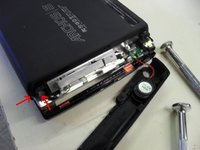
As laterais: há dois parafusos em cada canto (totalizando oito parafusos), indicados pelas setas vermelhas na imagem abaixo. O dispositivo de metal na primeira imagem é a antena Wi-Fi.
-
-
-
-
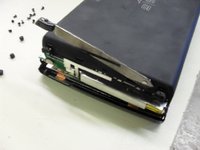
Após remover estes oito parafusos, você poderá afastar a tela do restante do dispositivo. Incline a pequena tira de plástico no conector para soltar a fiação. Separe a tela.
-
-
-
Sob a tela, você encontrará a parte superior da placa-mãe. Existem quatro parafusos prendendo a placa-mãe e o disco rígido juntos. Depois de removê-los, a parte traseira do dispositivo sairá.
-
-
-
Agora você tem acesso ao disco rígido. Leia a página sobre como acessar a partição oculta.
-
-
-
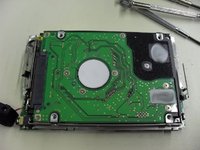
Esta é a parte inferior da placa-mãe, com o disco rígido desconectado.
-
-
-
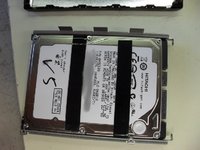
Outra foto da placa-mãe; ela é, na verdade, mais fina que o disco rígido.
-

 Pergunte ao FixBot






Documentos anexados

6Comentários do guia
What are the sockets called that plug it into the docking station?
Thanks
Is this device dead when I cant get it recognised by the computer with the repair or format function or any combination of resetting with the pin etc?
do I then HAVE to take the HDD out and try to read it to get my files off it or is there some secret way of accessing the files on the HDD without taking it apart?
Amanda, Yes, the device is dead and you would have to take it apart to get the HDD out. Sometimes this doesn’t work either. I have experienced both.
Bonjour, Sur mon archos 5, malgrés plusieurs reset et tentative de repair Disk, il n’affiche que le logo “Archos Entertainment you way” et boucle la dessus. Que pensez-vous de cette panne? Merci d’avance.
CDT
Hello,
Is it possible to migrate from the HDD drive to an SDD drive, maybe with a higher capacity ? Maybe by cloning the drive to preserve the system ?
If it's possible I will give a second lease of life to my Archos 5 IT !
