Ir para o conteúdo principal

iPhone 7 SIM Card Replacement

O que você precisa

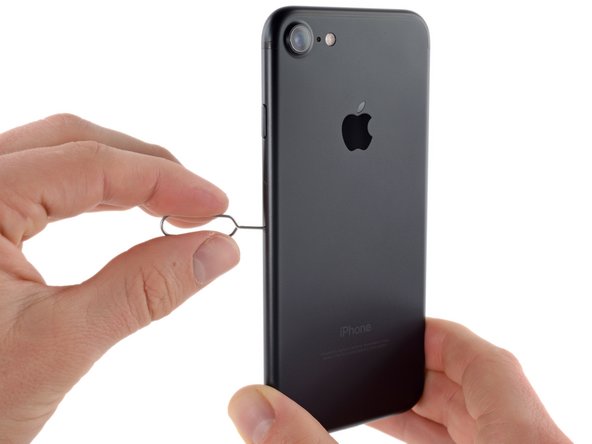
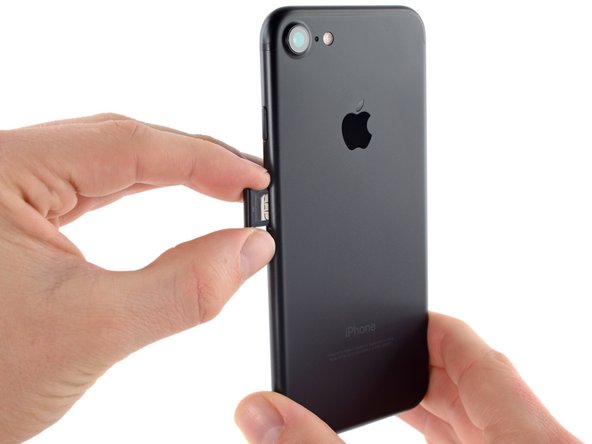
  1. iPhone 7 SIM Card Replacement, SIM Card: passo 1, imagem 1 %32 iPhone 7 SIM Card Replacement, SIM Card: passo 1, imagem 2 %32 iPhone 7 SIM Card Replacement, SIM Card: passo 1, imagem 3 %32
    • Insert a SIM card eject tool or a paperclip into the small hole in the SIM card tray.

    • Press to eject the tray.

    • This may require a significant amount of force. However, ensure the eject tool is properly aligned beforehand as to not damage the eject mechanism inside the phone.

    • Remove the SIM card tray assembly from the iPhone.

    • When reinserting the SIM card, ensure that it is in the proper orientation relative to the tray.

Conclusão

To reassemble your device, follow these instructions in reverse order.

36 outras pessoas executaram este guia.

Scott Havard

Membro desde: 06/27/16

50.864 Reputação

Autoria de 31 guias

2Comentários do guia

To fix the network

Kofi Samuel - Responder

how to fix j v sim on an iPhone 7

Odumah Terah - Responder

Comentar

Visualizações:

Últimas 24 horas: 11

Últimos 7 dias: 109

Últimos 30 dias: 386

Ao todo: 60,267