Ir para o conteúdo principal
Participe da comunidade de reparos - Criar conta

iPad Mini CDMA Battery Connector Replacement

Pré-requisito somente
Este é um guia somente para pré-requisitos! Este guia faz parte de outro procedimento e não deve ser usado sozinho.

O que você precisa

  1. iPad Mini CDMA Battery Connector Replacement, Battery Connector: passo 1, imagem 1 %32
    • Remove the three 1.3 mm Phillips #00 screws securing the connector shield to the logic board.

    • Be sure to not substitute these three screws with any other screws, specifically the screws securing the LCD shield plate to the rear case of the iPad. Any slightly longer screws may strip the screw holes and result in irreparable damage to the logic board.

  2. iPad Mini CDMA Battery Connector Replacement: passo 2, imagem 1 %32
    Ferramenta utilizada neste passo:
    Tweezers
    $4.99
    • Use a pair of tweezers to grasp and remove the connector shield from the iPad.

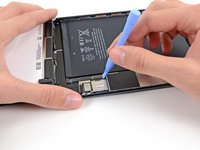
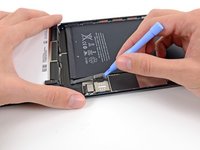
  3. iPad Mini CDMA Battery Connector Replacement: passo 3, imagem 1 %32 iPad Mini CDMA Battery Connector Replacement: passo 3, imagem 2 %32
    • Use a plastic opening tool to gently pry the battery connector up from its socket on the logic board.

    • Be very careful to only pry up on the battery connector and not on the socket itself. If you pry up on the logic board socket, you may break the connector entirely.

Conclusão

To reassemble your device, follow these instructions in reverse order.

Andrew Optimus Goldheart

Membro desde: 10/17/09

512.627 Reputação

Autoria de 407 guias

Equipe

iFixit Membro de iFixit

Staff

123 Membros

Autoria de 23.868 guias

0Comentários do guia

Comentar

Visualizações:

Últimas 24 horas: 1

Últimos 7 dias: 2

Últimos 30 dias: 4

Ao todo: 624