Ir para o conteúdo principal

iMac G3 Model M4984 Logic Board Replacement

O que você precisa

  1. iMac G3 Model M4984 Logic Board Replacement, Logic Board: passo 1, imagem 1 %32
    • The iMac G3. This was a great computer for the time, and had plenty of features.

  2. iMac G3 Model M4984 Logic Board Replacement: passo 2, imagem 1 %32
    • Start by flipping the iMac upside-down. It may help to lay it on a towel, so you don't damage the screen, or scratch the face.

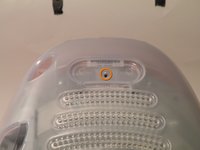
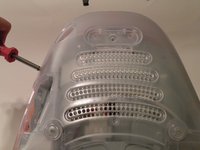
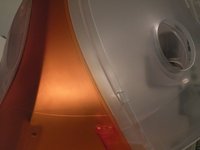
  3. iMac G3 Model M4984 Logic Board Replacement: passo 3, imagem 1 %32 iMac G3 Model M4984 Logic Board Replacement: passo 3, imagem 2 %32 iMac G3 Model M4984 Logic Board Replacement: passo 3, imagem 3 %32
    • Remove this Phillips screw.

    • Using a flathead screwdriver, work your way around the bottom cover, until it comes off.

    • Then, lift the bottom cover up and out, and set it aside.

  4. iMac G3 Model M4984 Logic Board Replacement: passo 4, imagem 1 %32 iMac G3 Model M4984 Logic Board Replacement: passo 4, imagem 2 %32 iMac G3 Model M4984 Logic Board Replacement: passo 4, imagem 3 %32
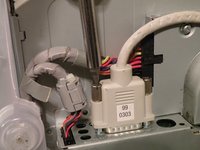
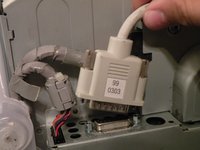
    • Now, remove the DB-15 Video connector from the logic board.

    • It may be helpful to use a Phillips screwdriver to remove the thumbscrews.

  5. iMac G3 Model M4984 Logic Board Replacement: passo 5, imagem 1 %32 iMac G3 Model M4984 Logic Board Replacement: passo 5, imagem 2 %32 iMac G3 Model M4984 Logic Board Replacement: passo 5, imagem 3 %32
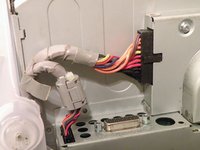
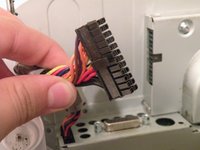
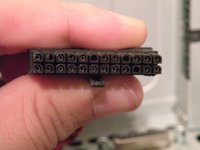
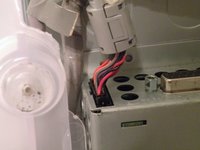
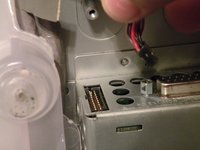
    • Remove the power cable from the logic board assembly.

  6. iMac G3 Model M4984 Logic Board Replacement: passo 6, imagem 1 %32 iMac G3 Model M4984 Logic Board Replacement: passo 6, imagem 2 %32
    • Remove the front panel connector. (You may also need to remove an additional screw that connects the front panel connector to the logic board assembly).

  7. iMac G3 Model M4984 Logic Board Replacement: passo 7, imagem 1 %32 iMac G3 Model M4984 Logic Board Replacement: passo 7, imagem 2 %32 iMac G3 Model M4984 Logic Board Replacement: passo 7, imagem 3 %32
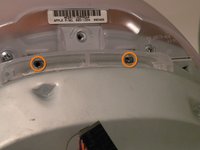
    • Now, remove these Phillips screws.

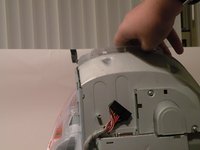
    • Now, grab the logic board assembly by the piece of plastic, and lift it out.

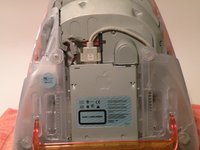
  8. iMac G3 Model M4984 Logic Board Replacement: passo 8, imagem 1 %32
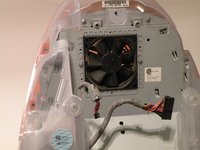
    • The logic board assembly. This is the heart of the computer, it contains the motherboard, CPU, RAM, V-RAM, PRAM battery, the hard drive, and the optical drive.

Conclusão

To reassemble your device, follow these instructions in reverse order.

13 outras pessoas executaram este guia.

Chris Green

Membro desde: 10/11/09

38.086 Reputação

Autoria de 49 guias

Equipe

Master Techs Membro de Master Techs

Community

329 Membros

Autoria de 1.451 guias

2Comentários do guia

Just did this on my Grape 333 Mhz and on my Lime 333 Mhz which come from from the same place. Actually, I'm surprised that the Grape's logic board has a white IrDA connector which its twin doesn't have...

Nicolas Zbinden - Responder

Some corrections based on https://everymac.com/systems/apple/imac/... ... The Rev. A and B sold in 1998 were all Bondi Blue in color (bond-EYE). The 5 flavors launched in 1999, and could be called a Rev. C but I don't know if anyone calls them that. The 1999 models share the same Model number and ID as the Rev. A and B but with a different order number. As well as the colors they had a spec-bumped CPU and hard drive, and minor manufacturing changes including the removal of the internal Mezzanine connector.

Pierre Houston - Responder

Comentar

Visualizações:

Últimas 24 horas: 4

Últimos 7 dias: 25

Últimos 30 dias: 79

Ao todo: 19,618