Ir para o conteúdo principal
Participe da comunidade de reparos - Criar conta

Xiaomi Redmi Note 4X Battery Replacement

O que você precisa

  1. Xiaomi Redmi Note 4X Battery Replacement, Removing the back cover: passo 1, imagem 1 %32 Xiaomi Redmi Note 4X Battery Replacement, Removing the back cover: passo 1, imagem 2 %32 Xiaomi Redmi Note 4X Battery Replacement, Removing the back cover: passo 1, imagem 3 %32
    • The first thing we have to do is use a pry tool to remove the back cover (make sure to remove the sim tray first)

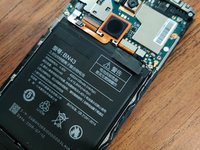
  2. Xiaomi Redmi Note 4X Battery Replacement, Removing the Battery: passo 2, imagem 1 %32 Xiaomi Redmi Note 4X Battery Replacement, Removing the Battery: passo 2, imagem 2 %32 Xiaomi Redmi Note 4X Battery Replacement, Removing the Battery: passo 2, imagem 3 %32
    • Now we have to remove the battery, luckily the Battery can be removed first after taking the back cover off.

  3. Xiaomi Redmi Note 4X Battery Replacement, Reassembly: passo 3, imagem 1 %32 Xiaomi Redmi Note 4X Battery Replacement, Reassembly: passo 3, imagem 2 %32
    • Now you can insert your new battery, pop the back cover on, and your good to go! Congratulations, you've just replaced your phone's battery.

Conclusão

Congratulations on repairing your smartphone!

2 outras pessoas executaram este guia.

Isaiah Kochis

Membro desde: 09/02/20

235 Reputação

Autoria de 2 guias

0Comentários do guia

Comentar

Visualizações:

Últimas 24 horas: 0

Últimos 7 dias: 19

Últimos 30 dias: 94

Ao todo: 4,193