Ir para o conteúdo principal

Xbox One Wireless Controller Model 1537 (Left) Bumper Replacement

O que você precisa

  1. Xbox One Wireless Controller Model 1537 (Left) Bumper Replacement, Bumper: passo 1, imagem 1 %32
    • Remove the battery cover.

    • Remove batteries.

  2. Xbox One Wireless Controller Model 1537 (Left) Bumper Replacement: passo 2, imagem 1 %32 Xbox One Wireless Controller Model 1537 (Left) Bumper Replacement: passo 2, imagem 2 %32 Xbox One Wireless Controller Model 1537 (Left) Bumper Replacement: passo 2, imagem 3 %32
    • Grip the controller firmly to remove the side handle cover.

    • Use a flathead screwdriver or a spudger to wedge between the seams of the front to the side handle of the controller.

    • Move the flathead screwdriver all the way around the side plates seam and push the plate forward.

  3. Xbox One Wireless Controller Model 1537 (Left) Bumper Replacement: passo 3, imagem 1 %32 Xbox One Wireless Controller Model 1537 (Left) Bumper Replacement: passo 3, imagem 2 %32
    • Use a screwdriver and punch a hole directly in the center label. There you will find a hidden screw.

    • Remove the five 10mm screws located on the back of the controller using a T8 screwdriver.

  4. Xbox One Wireless Controller Model 1537 (Left) Bumper Replacement: passo 4, imagem 1 %32 Xbox One Wireless Controller Model 1537 (Left) Bumper Replacement: passo 4, imagem 2 %32
    • Remove the backplate.

  5. Xbox One Wireless Controller Model 1537 (Left) Bumper Replacement: passo 5, imagem 1 %32 Xbox One Wireless Controller Model 1537 (Left) Bumper Replacement: passo 5, imagem 2 %32
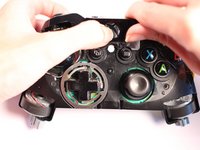
    • Remove the faceplate.

  6. Xbox One Wireless Controller Model 1537 (Left) Bumper Replacement: passo 6, imagem 1 %32 Xbox One Wireless Controller Model 1537 (Left) Bumper Replacement: passo 6, imagem 2 %32 Xbox One Wireless Controller Model 1537 (Left) Bumper Replacement: passo 6, imagem 3 %32
    • Remove the cover piece surrounding the Xbox button off of its pegs.

    • Firmly hold controller and push cover piece up from the pegs.

    • Press the Xbox button down to assist in the unclipping of the piece.

  7. Xbox One Wireless Controller Model 1537 (Left) Bumper Replacement: passo 7, imagem 1 %32 Xbox One Wireless Controller Model 1537 (Left) Bumper Replacement: passo 7, imagem 2 %32
    • Remove the broken bumper by unclipping it from its pegs.

    • Hold the controller firmly and push the bumper piece up from its pegs to unclip.

  8. Xbox One Wireless Controller Model 1537 (Left) Bumper Replacement: passo 8, imagem 1 %32 Xbox One Wireless Controller Model 1537 (Left) Bumper Replacement: passo 8, imagem 2 %32 Xbox One Wireless Controller Model 1537 (Left) Bumper Replacement: passo 8, imagem 3 %32
    • Align the replacement bumper onto the pegs, push gently and click into place.

Conclusão

To reassemble your device, follow these instructions in reverse order.

20 outras pessoas executaram este guia.

3Comentários do guia

On my controller the screws were T8 security type, so you'll need bits with a hole in the middle

Sean H - Responder

Is there a way to do this without removing all of the front and grip.

Alan Marantos - Responder

J'ai un problème c'est que j'arrive pas à retirer les 5 vis certaines sont bloqués j'ai l'impression vous auriez pas une solution

Ratz - Responder

Comentar

Visualizações:

Últimas 24 horas: 18

Últimos 7 dias: 107

Últimos 30 dias: 464

Ao todo: 61,351