Ir para o conteúdo principal
Participe da comunidade de reparos - Criar conta

Winix C545 Filter Replacement

O que você precisa

  1. Winix C545 Filter Replacement, Filter: passo 1, imagem 1 %32
    • Ensure that the Winix C545 Air Purifier is unplugged from any electrical outlets.

  2. Winix C545 Filter Replacement: passo 2, imagem 1 %32 Winix C545 Filter Replacement: passo 2, imagem 2 %32 Winix C545 Filter Replacement: passo 2, imagem 3 %32
    • Remove the front panel by grasping its outer upper edge and gently pulling forward.

  3. Winix C545 Filter Replacement: passo 3, imagem 1 %32 Winix C545 Filter Replacement: passo 3, imagem 2 %32
    • Remove the pre-filter (metal screen), by unclasping the two clips on the top.

    • If necessary, use a vacuum cleaner or soft brush to clean this piece.

    • Place this aside.

  4. Winix C545 Filter Replacement: passo 4, imagem 1 %32 Winix C545 Filter Replacement: passo 4, imagem 2 %32
    • Pull out the Activated Carbon Filter (black sheet), and set it aside.

  5. Winix C545 Filter Replacement: passo 5, imagem 1 %32 Winix C545 Filter Replacement: passo 5, imagem 2 %32 Winix C545 Filter Replacement: passo 5, imagem 3 %32
    • Pull out the True HEPA filter using only the tab on the top of the filter and set it aside.

  6. Winix C545 Filter Replacement: passo 6, imagem 1 %32 Winix C545 Filter Replacement: passo 6, imagem 2 %32 Winix C545 Filter Replacement: passo 6, imagem 3 %32
    • Do the reverse of steps 5, and then 4 to replace the True HEPA air filter, and the carbon activated pre-filter.

    • Place the True HEPA filter into where the used one was, and place the black carbon-activated pre-filter on top of the True HEPA filter.

  7. Winix C545 Filter Replacement: passo 7, imagem 1 %32 Winix C545 Filter Replacement: passo 7, imagem 2 %32
    • Slide the metal pre-filter screen back into place, from the top downwards. Ensure that the two clips at the top are locked in place.

  8. Winix C545 Filter Replacement: passo 8, imagem 1 %32 Winix C545 Filter Replacement: passo 8, imagem 2 %32
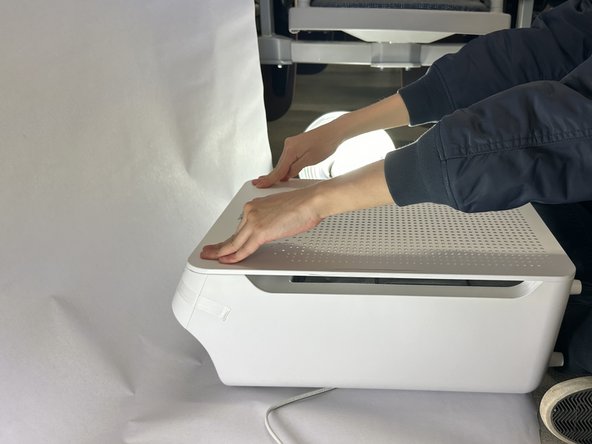
    • Close the front panel of the air purifier. First connect the panel to the two holes at the bottom of the purifier, and then push in at the top to lock the panel in place.

  9. Winix C545 Filter Replacement: passo 9, imagem 1 %32 Winix C545 Filter Replacement: passo 9, imagem 2 %32
    • To reset the filter replacement alert, use a thin object (like a paper clip) and insert it into the hole on the top with the refresh icon. Push down until you hear a beep.

Conclusão

The Air Purifier is now in working order. Enjoy the fresh air!

3 outras pessoas executaram este guia.

Kyle Lam

Membro desde: 04/15/24

229 Reputação

Autoria de 1 guia

Equipe

UC Davis, Team 2-5, Morris Spring 2024 Membro de UC Davis, Team 2-5, Morris Spring 2024

UCD-MORRIS-S24S2G5

3 Membros

1 Guia de autoria

0Comentários do guia

Comentar

Visualizações:

Últimas 24 horas: 3

Últimos 7 dias: 30

Últimos 30 dias: 160

Ao todo: 1,919