Ir para o conteúdo principal
Participe da comunidade de reparos - Criar conta

Thrustmaster T3PM Maintenance

O que você precisa

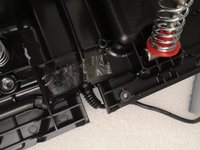
  1. Thrustmaster T3PM Maintenance, Disconnect the pedal heads: passo 1, imagem 1 %32 Thrustmaster T3PM Maintenance, Disconnect the pedal heads: passo 1, imagem 2 %32
    • Unscrew all 6 screws from the pedal heads

    • Note the positioning of the pedal heads or take this opportunity to try out new position

    • Before starting, unplug your T3PM.

    Pergunte ao FixBot
  2. Thrustmaster T3PM Maintenance, Remove screws from the bottom: passo 2, imagem 1 %32
    • Using Phillips screwdriver remove all screws at the bottom.

    Pergunte ao FixBot
  3. Thrustmaster T3PM Maintenance, Remove the top cover: passo 3, imagem 1 %32
    • Remove the top cover and put it aside

    Pergunte ao FixBot
    • Clean off any dust, residue, pet hair and other foreign debris that has accumulated inside the pedal set.

    Pergunte ao FixBot
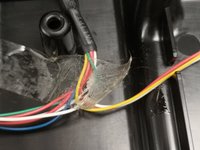
  4. Thrustmaster T3PM Maintenance, Inspect the wires and tape.: passo 5, imagem 1 %32 Thrustmaster T3PM Maintenance, Inspect the wires and tape.: passo 5, imagem 2 %32
    • Make sure that the wires and the main cable are secure.

    • Replace sticky tape if necessary.

    Pergunte ao FixBot
  5. Thrustmaster T3PM Maintenance, Thoroughly clean each pedal.: passo 6, imagem 1 %32
    • Clean off any dust, residue, pet hair etc from the pedals themselves, near the sensors and springs.

    • Make sure to clean off the extremities of the pedals.

    Pergunte ao FixBot
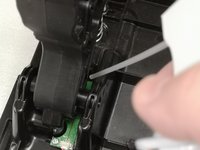
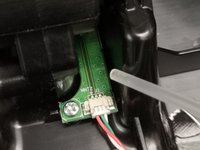
  6. Thrustmaster T3PM Maintenance, Clean the sensors: passo 7, imagem 1 %32 Thrustmaster T3PM Maintenance, Clean the sensors: passo 7, imagem 2 %32
    • Using an air-blower, compressed air-can or other tool, clean the sensors.

    • Be cautions as to not damage the sensors, wires or the connectors.

    • Watch out for Electro-static Discharge. Make sure not to touch the sensors or use anti-static wrist strap.

    Pergunte ao FixBot
  7. Thrustmaster T3PM Maintenance, Inspect the springs.: passo 8, imagem 1 %32
    • Inspect the conditions of the gas and clutch springs.

    • Re-lubricate if necessary.

    Pergunte ao FixBot
Conclusão

To reassemble your device, follow the steps 1,2,3 in reverse order.

Formica Fusca

Membro desde: 08/01/24

2.600 Reputação

Autoria de 15 guias

0Comentários do guia

Comentar

Visualizações:

Últimas 24 horas: 2

Últimos 7 dias: 28

Últimos 30 dias: 100

Ao todo: 1,535