Ir para o conteúdo principal
Participe da comunidade de reparos - Criar conta

Surface Studio M.2 SSD Replacement

Visualizações: 15 mil

Visualizar Estatísticas:

Últimas 24 horas:
5
Últimos 7 dias:
32
Últimos 30 dias:
167
Ao todo:
14.539
Comentários: 23

2 comments on steps, 21 guide comments.

Go to guide comments
Concluído: 7

7 pessoas marcaram este guia como "concluído". Será você o próximo?

Favorites: 1

1 pessoa favoritou (e se inscreveu) neste guia. Você será o próximo?

Tempo necessário: 10 - 20 minutos
Dificuldade: Moderado
Guia colaborativo

Foi um incrível membro de nossa comunidade quem criou este guia. Não foi ninguém da equipe iFixit, não.

Surface Studio M.2 SSD Replacement

Introdução

Ir para o passo 1 ↓

Do you want a bigger SSD or perhaps a faster PCIe NVMe SSD? Follow this guide to replace your SSD.

(Note: Surface Studio with Intel Core i5 comes with SATA III SSD while Surface Studio with Intel Core i7 comes with PCIe NVMe SSD.)

O que você precisa

Peças

Ferramentas

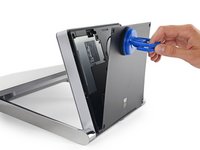
    1. Surface Studio M.2 SSD Replacement, M.2 SSD: passo 1, imagem 1 %32 Surface Studio M.2 SSD Replacement, M.2 SSD: passo 1, imagem 2 %32 Surface Studio M.2 SSD Replacement, M.2 SSD: passo 1, imagem 3 %32
      • Lay the Surface face down on a padded surface

      • Be careful not to scratch the screen when laying it face down

      • Remove the four rubber feet at each corner concealing the Torx screws

      • Remove the four Torx screws under the rubber feet.

      • Two screws on the upper corners are longer than two screws on the lower corners.

      • Attach suction cups to the bottom cover and then pull on the suction cups to free the bottom cover.

      Pergunte ao FixBot

      Comentar

    2. Surface Studio M.2 SSD Replacement: passo 2, imagem 1 %32 Surface Studio M.2 SSD Replacement: passo 2, imagem 2 %32
      • Remove five torx screws holding the two fans to the midframe

      • Remove the two fans

      • The fan connectors are behind the midframe and not yet accessible. Let the fans hang loosely until you can access the connectors.

      • Four large torx screws and four small torx screws hold the midframe to the upper frame.

      • Remove four large torx screws holding the midframe

      • Remove four small torx screws holding the midframe

      Pergunte ao FixBot

      Comentar

    3. Surface Studio M.2 SSD Replacement: passo 3, imagem 1 %32
      • Slowly remove the midframe

      • Be careful, the speaker on the midframe is still attached to the motherboard

      • Detach the connectors for the two fans and the speaker

      Pergunte ao FixBot

      Comentar

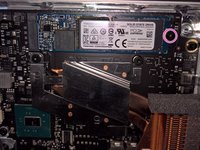
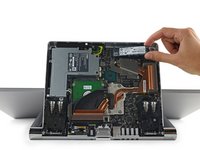
    4. Surface Studio M.2 SSD Replacement: passo 4, imagem 1 %32 Surface Studio M.2 SSD Replacement: passo 4, imagem 2 %32
      • With the midframe removed, the M.2 SSD is now accessible

      • Remove a torx screw holding the M.2 holding the SSD to the motherboard

      • Pull the SSD straight back

      • Do not pull the SSD upward or risk damaging the M.2 socket

      • The M.2 socket is compatible with most SATA III, PCIe ACHI, and PCIe NVMe in the M.2 2280 form factor

      Pergunte ao FixBot

      Comentar

Conclusão

To reassemble your device, follow these instructions in reverse order.

Cancelar: não concluí este guia.

7 outras pessoas executaram este guia.

The Raptor

Membro desde: 11/27/16

6.385 Reputação

Autoria de 6 guias

21Comentários do guia

I know that one of the very first questions would be: Does the M.2 slot supports PCIe NVMe ?

The answer is: Yes it does.

The Raptor - Responder Compartilhar

But it does not mean that you can get the drive to run in NVMe model.

There does not appear to be a setting to enable NVMe model for the drive.

John - Responder Compartilhar

Does it support bootable NVMe?

Mark Smith - Responder Compartilhar

@msmith4099 @theofficemaven

Sure. When installing Windows, choose to install Windows to "Drive 1" instead of "Drive 0"

The Raptor - Responder Compartilhar

Is there any raid options that need to be configured?

Mark Smith - Responder Compartilhar

Comentar

Visualizações:

Últimas 24 horas: 5

Últimos 7 dias: 32

Últimos 30 dias: 167

Ao todo: 14,539