Essa tradução foi gerada por um programa e ainda não foi revisada por uma pessoa. Falas essa língua? Dá uma olhada.

Substituição do conjunto da tela do Asus ZenBook UX303U

Última atualização em 7 de ago de 2026
Visualizações: 9,6 mil
Visualizar Estatísticas:
- Últimas 24 horas:
- 4
- Últimos 7 dias:
- 24
- Últimos 30 dias:
- 98
- Ao todo:
- 9.585
Comentários: 17
10 comments on steps, 7 guide comments.
Go to guide commentsConcluído: 8 9
8 pessoas marcaram este guia como "concluído". Será você o próximo?
9· pessoas marcaram este guia como "concluído". Incluindo você — ótimo trabalho!
Favorites: 0 1
Ninguém favoritou (e se inscreveu) neste guia como favorito. Você será o primeiro?
1 pessoa marcou como favorito (e assinou) este guia — você!
Introdução
Ir para o passo 1 ↓Este guia mostrará como substituir a tela de um notebook Asus ZenBook UX303U.
O que você precisa
Ferramentas


-
-
-
Remova os dois pés de borracha redondos na borda das dobradiças do laptop.
 Pergunte ao FixBot
-
-
-
Remova os onze parafusos Phillips #00 de 4 mm do painel traseiro.
-
-
-
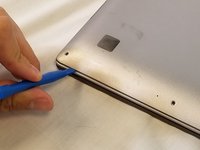
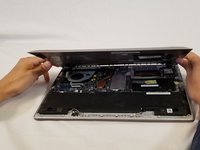
Com uma ferramenta de abertura de plástico, force o painel traseiro do laptop para removê-lo.
-
-
-
-
-
-
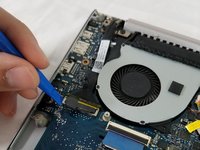
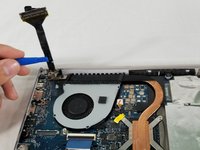
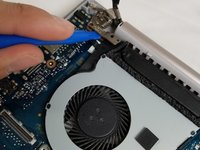
Desconecte o cabo que liga o conjunto da tela à placa-mãe.
-
-
-
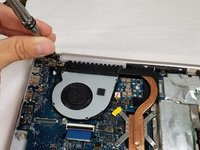
Remova os três parafusos Phillips #00 de 4 mm na dobradiça para soltar a ventoinha da placa-mãe.
-
Levante a dobradiça.
-
-
-
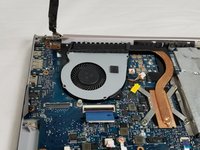
Remova os três parafusos Phillips #00 que prendem a dobradiça à placa de E/S.
-
-
-
Levante todo o conjunto inferior e retire-o das dobradiças que o mantêm no lugar.
-
-








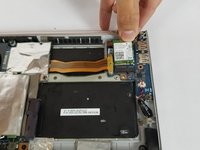
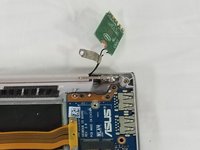


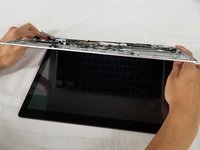
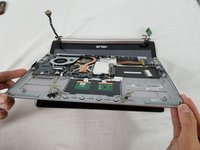
Para a remontagem de seu dispositivo, siga estas instruções na ordem inversa.
Cancelar: não concluí este guia.
8 outras pessoas executaram este guia.

Equipe

USF Tampa, Team S3-G5, Nance Spring 2018 Membro de USF Tampa, Team S3-G5, Nance Spring 2018
USFT-NANCE-S18S3G5
3 Membros
Autoria de 60 guias
7Comentários do guia
If anyone knows of a good, reliable source to buy a replacement screen assembly let me know, please. I have a 303U with the 1800 screen and I accidentally sat something heavy enough on top of the laptop to crack the screen on the right-third of the screen. I can’t use half of the touch screen and it’s fairly obvious depending on the color/brightness of the content I’m looking at. Would like to be able to replace this and these steps are pretty easy for me to follow so I’m confident I can have a newish looking laptop again if I can find a replacement screen.
Hi ! Did you manage to find one? I’m trying to do the same thing :)
The bottom of the pictured device may feature Phillips #00 screws, but I also have this laptop and the screws around the edge of the bottom panel are Torx T5s on my device.
It seems that the hinge assembly on one side is broken on my UX303U, on the screen side of the hinge. Do I need to replace the whole screen assembly? The laptop works perfectly otherwise.
Same here, asus ux303u screen side hinge is stuffed. But I think it may actually be the plastic screen cover itself where the hinge attaches, not just the hinge.
