Essa tradução foi gerada por um programa e ainda não foi revisada por uma pessoa. Falas essa língua? Dá uma olhada.

Substituição da bateria do ThinkPad Yoga 12

Última atualização em 7 de ago de 2026
Visualizações: 7,8 mil
Visualizar Estatísticas:
- Últimas 24 horas:
- 3
- Últimos 7 dias:
- 25
- Últimos 30 dias:
- 76
- Ao todo:
- 7.829
Comentários: 2
1 comment on steps, 1 guide comment.
Go to guide commentsConcluído: 9 10
9 pessoas marcaram este guia como "concluído". Será você o próximo?
10· pessoas marcaram este guia como "concluído". Incluindo você — ótimo trabalho!
Favorites: 1 2
1 pessoa favoritou (e se inscreveu) neste guia. Você será o próximo?
2 pessoas marcaram como favorito (e assinaram) este guia - incluindo você!
Guia colaborativo
Foi um incrível membro de nossa comunidade quem criou este guia. Não foi ninguém da equipe iFixit, não.
Introdução
Ir para o passo 1 ↓Agora a carga da bateria do seu computador finalmente durará mais de 1 hora!
O que você precisa


-
-
-
Remova os dez parafusos Phillips usando uma chave Phillips 00
 Pergunte ao FixBot
-
-
-
Com cuidado, use uma espátula para levantar a carcaça.
-
-
-
-
-
-
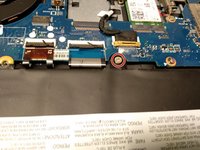
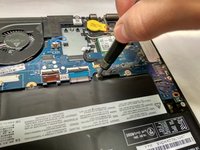
Remova o único parafuso Phillips com uma chave Phillips #0.
-
-
-
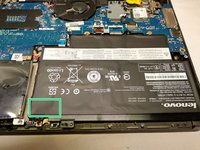
Levante a bateria com cuidado. Existe um pouco de adesivo por baixo da parte verde.
-
-
-
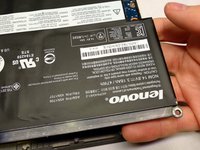
Puxe cuidadosamente o conector para fora debaixo da placa lógica para remover a bateria.
-
-






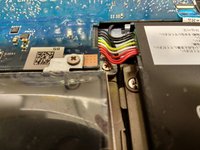
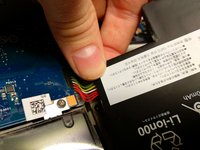
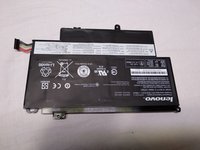
Para a remontagem de seu dispositivo, siga estas instruções na ordem inversa.
Cancelar: não concluí este guia.
9 outras pessoas executaram este guia.

1Comentário do guia
These directions (and those for replacing the SSD) were very helpful. Everything worked well for about a week after which time the battery started having charging problems (again). The computer will start to charge, get to ~25% at which point the machine reports that it’s charging, but doesn’t get beyond ~25%. “Troubleshooting” in Win 10 doesn’t reveal any troubles to shoot. I am now trying to figure out whether the problem is with the new (supposedly Lenovo-brand) battery or perhaps the power cord. Any suggestions?
