Essa tradução foi gerada por um programa e ainda não foi revisada por uma pessoa. Falas essa língua? Dá uma olhada.

Substituição da bateria do Motorola Droid RAZR

Última atualização em 20 de jul de 2026
Visualizações: 213 mil
Visualizar Estatísticas:
- Últimas 24 horas:
- 3
- Últimos 7 dias:
- 34
- Últimos 30 dias:
- 159
- Ao todo:
- 212.852
Comentários: 17
9 comments on steps, 8 guide comments.
Go to guide commentsConcluído: 46 47
46 pessoas marcaram este guia como "concluído". Será você o próximo?
47· pessoas marcaram este guia como "concluído". Incluindo você — ótimo trabalho!
Favorites: 17 18
17 pessoas favoritaram (e se inscreveram) neste guia. Você será o próximo?
18 pessoas marcaram como favorito (e assinaram) este guia - incluindo você!
Guia em destaque
Este guia foi considerado super bacana pela equipe da iFixit.
Introdução
Ir para o passo 1 ↓Dê vida nova ao seu Droid RAZR com uma bateria de reposição.
Se a sua bateria estiver inchada, tome as precauções adequadas.
O que você precisa
Ferramentas
-
Spudger4.9


-
-
-
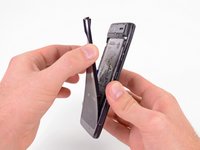
Insira uma Ferramenta de abertura entre a capa traseira e a carcaça traseira na borda inferior esquerda da capa traseira.
-
Alavanque a capa traseira com a Ferramenta de abertura para soltar os clipes de plástico.
-
Continue alavancando ao longo da borda esquerda da capa traseira em direção à parte superior do celular.
 Pergunte ao FixBot
-
-
-
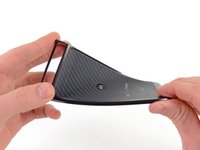
Deslize a Ferramenta de abertura ao longo da parte superior da capa traseira para soltar os clipes plásticos.
-
Continue fazendo alavanca pelo lado direito da capa traseira para soltar os clipes restantes.
-
-
-
-
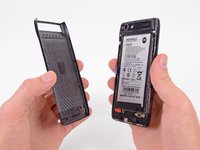
Puxe a capa traseira para longe do celular para removê-la.
-
-
-
-
-
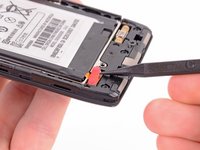
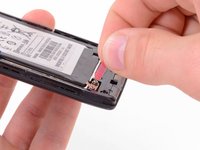
Use a ponta de uma espátula para levantar a cobertura de silicone vermelha sobre os parafusos do terminal de bateria e remova-a.
-
-
-
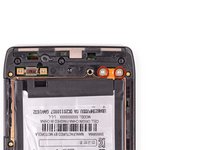
Remova os dois parafusos Torx T5 de 3,3 mm do terminal de bateria.
-
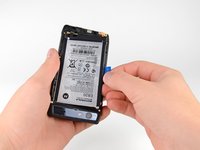
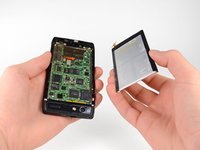
Segure a aba azul de remoção da bateria e levante a bateria para retirá-la.
-
-






Para a remontagem de seu dispositivo, siga estas instruções na ordem inversa.
Cancelar: não concluí este guia.
46 outras pessoas executaram este guia.

8Comentários do guia
Where can i get a battery?
You can find a replacement Droid Razr Battery at www.cellphone-repair-shop.com
Great guide. Honestly the spudger tool made it soooo easy.. I even used the spuder to remove the case from the phone. gently inserting the spudger while using slight pressure on removing the case. you could hear the small cracks as the adhesive gave way.. Take your time when doing this and it will come out just fine.... Also used the spudger on removing the battery from the case..... again carefully inserting the tool while pulling up slowly with the blue tab...
You guys rock.....Thanks again.
I bought a knock off brand battery off of amazon and used it. At first i thought it wouldn't work but after a little playing around with it i got it to fit. Big thing is be delicate, SLOWLY remove the back paneling and try not to bump the bottom thing where the screws go.
Very helpful and informative article, it made it easy for me to fix my phone at home. Thank you a million!
