Essa tradução foi gerada por um programa e ainda não foi revisada por uma pessoa. Falas essa língua? Dá uma olhada.

Substituição da bateria do HP Pavilion 11 x360

Natalie e
Última atualização em 6 de ago de 2026
Visualizações: 61 mil
Visualizar Estatísticas:
- Últimas 24 horas:
- 4
- Últimos 7 dias:
- 33
- Últimos 30 dias:
- 135
- Ao todo:
- 61.380
Comentários: 14
3 comments on steps, 11 guide comments.
Go to guide commentsConcluído: 27 28
27 pessoas marcaram este guia como "concluído". Será você o próximo?
28· pessoas marcaram este guia como "concluído". Incluindo você — ótimo trabalho!
Favorites: 4 5
4 pessoas favoritaram (e se inscreveram) neste guia. Você será o próximo?
5 pessoas marcaram como favorito (e assinaram) este guia - incluindo você!
Introdução
Ir para o passo 1 ↓Comece certificando-se de que o seu dispositivo esteja desligado e desconectado de qualquer fonte de energia.
O que você precisa
Ferramentas
-
Spudger4.9


-
-
-
Use a espátula para soltar os dois pés de borracha próximos à dobradiça do laptop. Isso revelará dois parafusos de 9 mm ocultos.
-
Você deve remover onze parafusos.
-
Quatro parafusos de 9 mm com a chave PH0.
-
Sete parafusos de 6 mm com a chave PH0.
 Pergunte ao FixBot
-
-
-
Use a espátula para fazer alavanca nos cantos do laptop próximos às dobradiças da tela.
-
Faça alavanca ao redor da borda do laptop com a Ferramenta de abertura até que a capa traseira comece a se soltar.
-
-
-
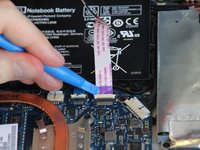
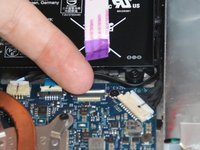
Use a Ferramenta de abertura para levantar a aba branca na conexão.
-
Puxe o cabo para fora.
-
-
-
-
-
-
Remova os quatro parafusos de 6 mm da bateria com a chave PH0.
-
-
-
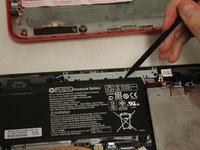
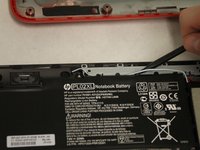
Use a espátula para levantar os fios azul/brancos do alto-falante que passam ao lado da bateria.
-
-
-
Desconecte o cabo da bateria da placa-mãe puxando suavemente a parte preta do cabo mais próxima da aba branca.
-
-




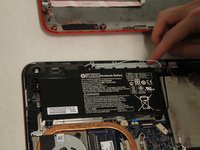


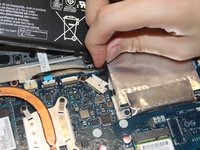
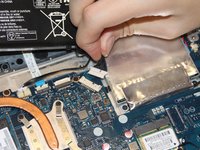


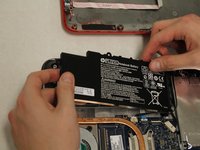
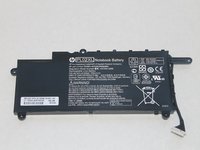
Para a remontagem de seu dispositivo, siga estas instruções na ordem inversa.
Cancelar: não concluí este guia.
27 outras pessoas executaram este guia.

Equipe

Cal Poly, Team 19-9, Maness Winter 2015 Membro de Cal Poly, Team 19-9, Maness Winter 2015
CPSU-MANESS-W15S19G9
4 Membros
Autoria de 72 guias
11Comentários do guia
exellent and easy steps............but......where do i buy battery.....?
Muy bueno parece facil
Great step by step explanation. Solid pictures!!! Could not have fixed this without your contribution!!!
Purchased this laptop 28/12/2015 and now its just not switching on at all. I will try the repair instructions but I think it should have lasted a bit longer, what ever the problem is. The store where I bought it have checked the cable for me to see if that was the problem and it wasn’t. They wanted £60 to send it off, to find out the issue before anything was even done. The sales assistant said it could be the battery but he said it should have lasted longer. He basically said if its the motherboard you may as well just throw it out. I am sick of paying £100’s out for electrical items that live very short lives. My daughter bought this with her own money that she had been saving. I would not purchase this make of laptop again and where do I get a replacement battery and how much is that likely to be?
Very good guide, thank you!
