Introdução
Use this guide to bring back to life your Ericsson W810i
In three simple steps this guide will show you how to replace your battery on your Sony Ericsson W810i.
You might use this guide when the battery on your device is either not functioning properly or you feel it does not have the capacity it did when you first received the device.
After completion of your device battery replacement. The device should power up and should operate normally.
There is no special tools or skills required.
Battery Information:
- Li-Po 900 mAh (BST-37)
- Stand-by: Up to 350 h
- Talk time: Up to 8 h
-
-
Place your Sony Ericsson W810I screen side down with the battery cover facing up as shown.
-
-


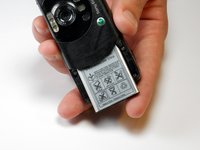
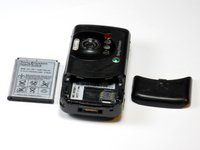
To reassemble your device, follow these instructions in reverse order.
Cancelar: não concluí este guia.
2 outras pessoas executaram este guia.

Equipe

Cuesta, Team 1-7, Zipperian Fall 2011 Membro de Cuesta, Team 1-7, Zipperian Fall 2011
CUESTA-ZIPPERIAN-F11S1G7
1 Membro
Autoria de 14 guias
