Introdução
Whether it's due to dust, wear, or physical damage, the main button circuit board may need to be replaced at some point. This guide focuses on how to install a new main button circuit board to get your Sony Bloggie 3D Player running like new.
O que você precisa
-
-
Remove the two 2.5mm Phillips #00 screws using the Philips #00 screwdriver.
-
-
-
Ferramenta utilizada neste passo:Tweezers$4.99
-
Detach the board from the ZIF connector using a pair of tweezers or by hand.
-
Flip the circuit board over and remove the connector on the backside. Now you can safely remove the circuit board.
-


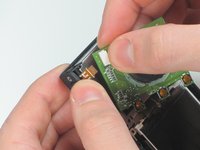
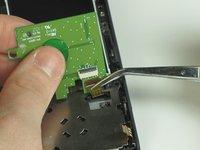
To reassemble your device, follow these instructions in reverse order.
Cancelar: não concluí este guia.
Uma outra pessoa concluiu este guia.



Equipe

Cal Poly, Team 7-12, Maness Winter 2013 Membro de Cal Poly, Team 7-12, Maness Winter 2013
CPSU-MANESS-W13S7G12
5 Membros
Autoria de 15 guias
