Introdução
You may need to replace your USB port if you are unable to charge your phone or if your phone charges slowly.
This guide will take tell you what tools you need and how to open your device and get to the USB component.
O que você precisa
-
-
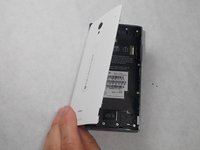
Peel back the back cover of the phone from the access point to remove it. It should come off easily using your hands.
 Pergunte ao FixBot
-
-
-
Remove seven 3mm Star #5 screws shown in the picture with a screwdriver.
-
Remove two 3.5mm Star #5 screws shown in the picture with a screwdriver.
-
Remove two 5mm Star #5 screws shown in the picture with a screwdriver.
-
-
-
-
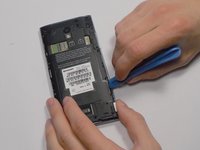
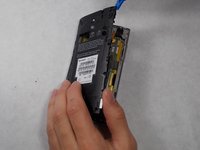
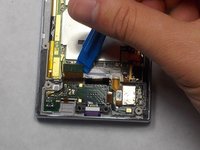
Pry open the back panel using a plastic opening tool. Do this around the edges until you are able to lift it off.
-
-
-
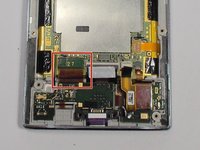
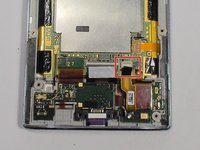
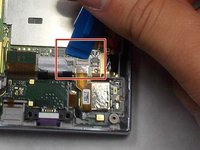
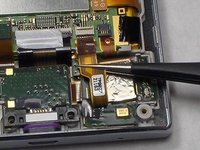
To disconnect the cable, use the tip of a spudger or your fingernail to flip up the small retaining flap. Then, you can safely pull the ribbon cable out.
-
-
-
After removing the wires, carefully snap out the usb port with your hands. It is held down by some plastic clips, so some force may be needed.
-









To reassemble your device, follow these instructions in reverse order.
Cancelar: não concluí este guia.
2 outras pessoas executaram este guia.

Equipe

UMass Dartmouth, Team 7-4, Catania Spring 2016 Membro de UMass Dartmouth, Team 7-4, Catania Spring 2016
UMASSD-CATANIA-S16S7G4
3 Membros
Autoria de 24 guias
