Introdução
This guide details how to install a new camera button on your Samsung Moment SPH M900. The camera button is located on the lower right side, distinguished by a black line. We provide directions for both disassembly and reassembly.
O que você precisa
-
-
Power off the phone using the "Power Button", the circular middle button in the center of the phone.
-
Locate the camera button on bottom right side of your phone
-
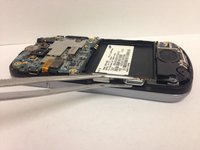
Remove the back panel of the phone by sliding the spudger along the edge of the phone. The rear plastic panel will snap off from the remainder of the phone.
-
-



To reassemble your device, follow these instructions in reverse order.
Be sure to gently slide the memory card back in its holder.
Cancelar: não concluí este guia.
3 outras pessoas executaram este guia.



