Introdução
For the official iFixit guide to repair your Galaxy S5 nicroSD card, click here. The guide you are currently viewing is duplicate content, archived here for historical purposes only.
O que você precisa
-
-
Remove the rear case by using moderate force to pry the divot on the left of the rear facing camera with a plastic opening tool or your fingernail.
-
Continue to lift the case, working your way around the perimeter until the entire rear cover is removed.
 Pergunte ao FixBot
-
-
-
-
Lift the battery upward with your finger or plastic opening tool by pushing on the notch located on the bottom of the battery.
-
Remove the battery from the phone.
-
-
-
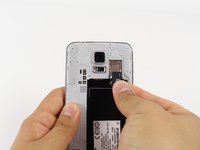
Gently slide out the SD card using your fingernail or a plastic opening tool.
-


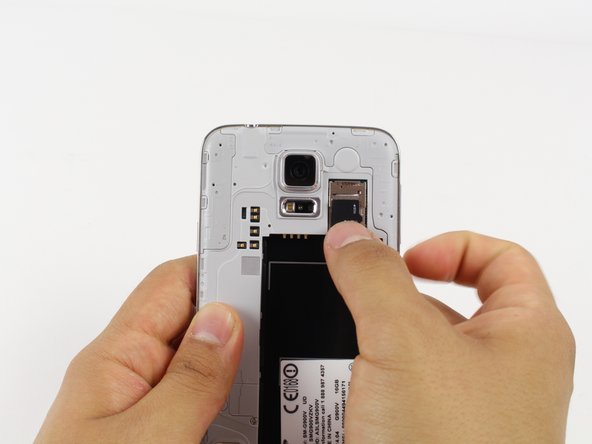
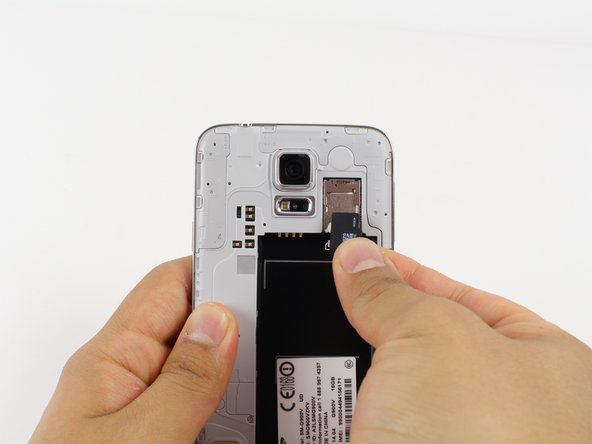
To reassemble your device, follow these instructions in reverse order.
Cancelar: não concluí este guia.
5 outras pessoas executaram este guia.

Equipe

Cal Poly, Team 10-57, Amido Spring 2014 Membro de Cal Poly, Team 10-57, Amido Spring 2014
CPSU-AMIDO-S14S10G57
4 Membros
Autoria de 12 guias
1Comentário do guia
Actually the battery does not even have to be removed (just unmount in settings first to avoid corruption)
Simply slide the card back until it runs into the battery, then just lift out.
