Ir para o conteúdo principal
Participe da comunidade de reparos - Criar conta

Samsung Galaxy J3 Emerge Home Button and Audio Jack Replacement

Visualizações: 2,2 mil

Visualizar Estatísticas:

Últimas 24 horas:
2
Últimos 7 dias:
13
Últimos 30 dias:
50
Ao todo:
2.208
Comentários: 0

Ninguém deixou comentários sobre este guia. Você será o primeiro?

Go to guide comments
Concluído: 2

2 pessoas marcaram este guia como "concluído". Será você o próximo?

Favorites: 0

Ninguém favoritou (e se inscreveu) neste guia como favorito. Você será o primeiro?

Tempo necessário: 15 minutos
Dificuldade: Moderado
Samsung Galaxy J3 Emerge Home Button and Audio Jack Replacement

Introdução

Ir para o passo 1 ↓

Home Button and Audio Jack guide for a Samsung Galaxy J3 Emerge Model SM-J327P. May need to replace the home button if it is unresponsive. If audio becomes distorted when plugged in to the jack it needs replacing.

O que você precisa

Ferramentas

    1. Samsung Galaxy J3 Emerge Home Button and Audio Jack Replacement, Screen: passo 1, imagem 1 %32 Samsung Galaxy J3 Emerge Home Button and Audio Jack Replacement, Screen: passo 1, imagem 2 %32 Samsung Galaxy J3 Emerge Home Button and Audio Jack Replacement, Screen: passo 1, imagem 3 %32
      • Heat up the edges of the screen with a hair dryer.

      • Put the iFixit Opening Tool between the screen and body to open the edge of the screen up.

      • Work the iFixit Opening Tools around the whole screen to break the glue.

      Pergunte ao FixBot

      Comentar

    2. Samsung Galaxy J3 Emerge Home Button and Audio Jack Replacement: passo 2, imagem 1 %32 Samsung Galaxy J3 Emerge Home Button and Audio Jack Replacement: passo 2, imagem 2 %32
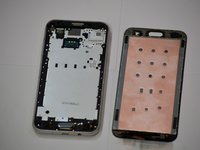
      • Lift the screen up from the bottom.

      • The screen could crack when lifting it up.

      • Pry the gray cover open.

      Pergunte ao FixBot

      Comentar

    3. Samsung Galaxy J3 Emerge Home Button and Audio Jack Replacement: passo 3, imagem 1 %32 Samsung Galaxy J3 Emerge Home Button and Audio Jack Replacement: passo 3, imagem 2 %32
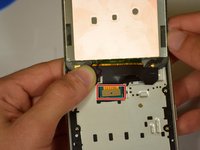
      • Pry the connector off of the motherboard by using a clean nail or the iFixit opening tool.

      Pergunte ao FixBot

      Comentar

    1. Samsung Galaxy J3 Emerge Home Button and Audio Jack Replacement, Motherboard: passo 4, imagem 1 %32 Samsung Galaxy J3 Emerge Home Button and Audio Jack Replacement, Motherboard: passo 4, imagem 2 %32
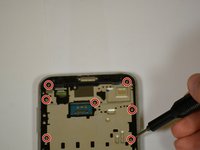
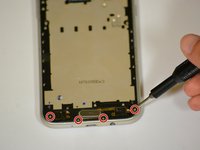
      • Remove the eleven Phillips #00 3.5mm screws.

      • If the screws get stuck when removing, try using tape to get them out. Place the adhesive side of tape on the screws and pull the tape off the spot.

      Pergunte ao FixBot

      Comentar

    2. Samsung Galaxy J3 Emerge Home Button and Audio Jack Replacement: passo 5, imagem 1 %32
      • Turn the phone over and push down where the battery was.

      • There will be a loud clicking noise when applying pressure.

      Pergunte ao FixBot

      Comentar

    3. Samsung Galaxy J3 Emerge Home Button and Audio Jack Replacement: passo 6, imagem 1 %32
      • Insert the iFixit Opening Pick between the motherboard and the panel.

      • Work the iFixit Opening Pick around the outside of the motherboard.

      Pergunte ao FixBot

      Comentar

    4. Samsung Galaxy J3 Emerge Home Button and Audio Jack Replacement: passo 7, imagem 1 %32 Samsung Galaxy J3 Emerge Home Button and Audio Jack Replacement: passo 7, imagem 2 %32
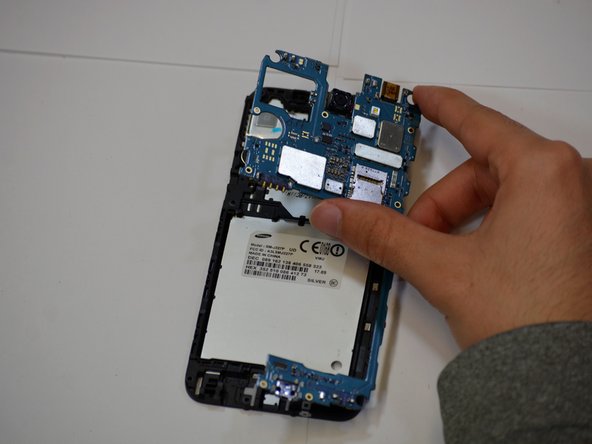
      • Pry the motherboard away from the phone using your hand.

      Pergunte ao FixBot

      Comentar

    1. Samsung Galaxy J3 Emerge Home Button and Audio Jack Replacement, Home Button and Audio Jack: passo 8, imagem 1 %32
      • Slide the home button to the left to pop it off.

      Pergunte ao FixBot

      Comentar

    2. Samsung Galaxy J3 Emerge Home Button and Audio Jack Replacement: passo 9, imagem 1 %32
      • Remove the connector where the home button was using the iFixit Opening Pick.

      Pergunte ao FixBot

      Comentar

    3. Samsung Galaxy J3 Emerge Home Button and Audio Jack Replacement: passo 10, imagem 1 %32
      • Lift up the connector and push it through the motherboard by following the ribbon.

      Pergunte ao FixBot

      Comentar

    4. Samsung Galaxy J3 Emerge Home Button and Audio Jack Replacement: passo 11, imagem 1 %32 Samsung Galaxy J3 Emerge Home Button and Audio Jack Replacement: passo 11, imagem 2 %32
      • Follow the ribbon and gently pop the audio port out using the iFixit Opening Pick.

      Pergunte ao FixBot

      Comentar

Conclusão

To reassemble your device, follow these instructions in reverse order.

Cancelar: não concluí este guia.

2 outras pessoas executaram este guia.

Autor(a)

com

Hugh Cosculluela

Membro desde: 01/24/19

531 Reputação

Autoria de 4 guias

Equipe

Cal Poly, Team S19-G2, White Winter 2019 Membro de Cal Poly, Team S19-G2, White Winter 2019

CPSU-WHITE-W19S19G2

4 Membros

Autoria de 60 guias

0Comentários do guia

Comentar

Visualizações:

Últimas 24 horas: 2

Últimos 7 dias: 13

Últimos 30 dias: 50

Ao todo: 2,208