Introdução
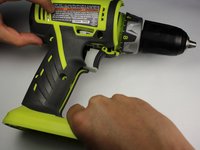
This guide covers the removal process of the outer case. The process does not require removing any of the internal electronics; however it is recommended that the battery is removed in order to reduce the risk of shock. The screws in the case are standard Torx T10 screws. It is advisable to have some place safe to keep all of the screws so that the case can be properly secured during reassembly.
O que você precisa
-
-
Detach the battery unit from the drill body by pressing the battery release buttons on both sides of the unit and pulling outwards.
-
-
-
-
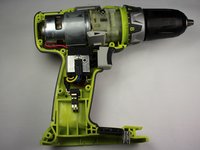
Use a Torx T10 screw driver to unscrew all ten 13.5 mm screws from the drill casing to gain access to the interior.
-


To reassemble your device, follow these instructions in reverse order.

Equipe

Cal Poly, Team 17-6, Forte Spring 2015 Membro de Cal Poly, Team 17-6, Forte Spring 2015
CPSU-FORTE-S15S17G6
4 Membros
Autoria de 10 guias
