Ir para o conteúdo principal
Participe da comunidade de reparos - Criar conta

PowerMac G4 M5183 Graphics Card Removal

O que você precisa

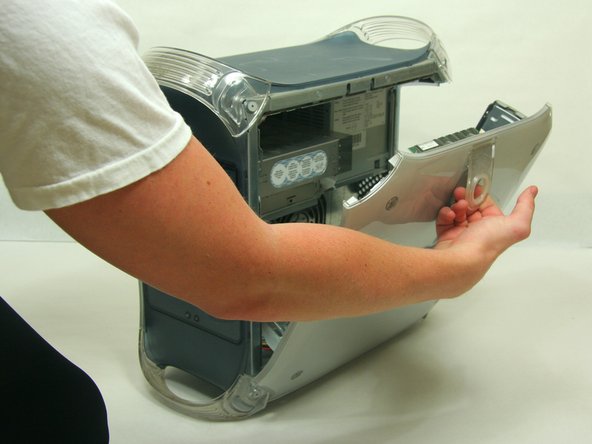
  1. PowerMac G4 M5183 Graphics Card Removal, Opening PowerMac G4 M5183 Case: passo 1, imagem 1 %32 PowerMac G4 M5183 Graphics Card Removal, Opening PowerMac G4 M5183 Case: passo 1, imagem 2 %32
    • Pull on outer latch.

    • Lower door until it is level with your work surface.

    • Before working on the computer make sure it is not plugged into a power supply, then touch a metal object. This discharges static electricity, which could damage the computer.

  2. PowerMac G4 M5183 Graphics Card Removal, Graphics Card: passo 2, imagem 1 %32 PowerMac G4 M5183 Graphics Card Removal, Graphics Card: passo 2, imagem 2 %32
    • Remove the single screw with the Phillips #1 screwdriver.

    • Pull the graphics card up and out.

Linha de Chegada

13 outras pessoas executaram este guia.

Justin Petrilli

Membro desde: 01/21/10

3.132 Reputação

Autoria de 11 guias

Equipe

Cal Poly, Team 13-24, Maness Winter 2010 Membro de Cal Poly, Team 13-24, Maness Winter 2010

CPSU-MANESS-W10S13G24

4 Membros

Autoria de 37 guias

2Comentários do guia

Do I need to avoid static to protect the board?

Jim Robson - Responder

Es ist eine deutsche Anleitung, aber auf der iFixit Übersicht als Englisch gekennzeichnet.

Toni Makkaroni - Responder

Comentar

Visualizações:

Últimas 24 horas: 5

Últimos 7 dias: 16

Últimos 30 dias: 48

Ao todo: 10,178