
Polaroid Onestep Close Up Primary Lens Replacement

Última atualização em 24 de nov de 2017
Visualizações: 2,3 mil
Visualizar Estatísticas:
- Últimas 24 horas:
- 4
- Últimos 7 dias:
- 25
- Últimos 30 dias:
- 96
- Ao todo:
- 2.270
Comentários: 2
2 comments on steps.
Concluído: 3 4
3 pessoas marcaram este guia como "concluído". Será você o próximo?
4· pessoas marcaram este guia como "concluído". Incluindo você — ótimo trabalho!
Favorites: 0 1
Ninguém favoritou (e se inscreveu) neste guia como favorito. Você será o primeiro?
1 pessoa marcou como favorito (e assinou) este guia — você!
Introdução
Ir para o passo 1 ↓This lens is what focuses the light on the mirror, and by extension the film, when taking photos. The shutter lies directly behind it. It is very easy to replace, as it only requires the removal of the front plate to access, and is held in place only by grooves into which it snaps into place. This guide will illustrate how to remove this primary lens.
O que você precisa
Ferramentas
-
Spudger4.9


-
-
-
Begin by opening the top of the camera (flash assembly) to a slight angle.
-
Next, angle the flash assembly slightly upward and pry off the connections carefully.
 Pergunte ao FixBot
-
-
-
Slide the action button, on the bottom of the camera, to open the bottom.
-
-
-
-
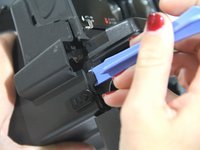
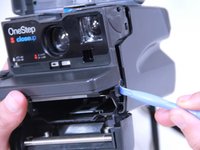
Insert the blue plastic opening tool between the rear case and the plastic tabs directly under the shelf, and pry it loose.
-
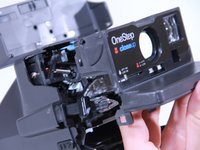
Pull off the face plate.
-
-
-
-
-
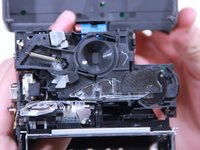
Once the front assembly is removed, the primary lens should be exposed without any trouble.
-
-
-
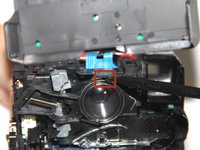
Use your spudger to leverage the lens from the groove at the top (red).
-
Pry the lens loose. It may pop out, so have a method in place to prevent it from dropping.
-
-




To reassemble your device, follow these instructions in reverse order.
Cancelar: não concluí este guia.
3 outras pessoas executaram este guia.

Equipe

USF Tampa, Team 3-5, Brown Fall 2014 Membro de USF Tampa, Team 3-5, Brown Fall 2014
USFT-BROWN-F14S3G5
3 Membros
Autoria de 72 guias
