
Penguin FZ-8 28” Tower Fan Blade Replacement

Ethan e
Última atualização em 14 de jun de 2021
Visualizações: 2,1 mil
Visualizar Estatísticas:
- Últimas 24 horas:
- 2
- Últimos 7 dias:
- 9
- Últimos 30 dias:
- 87
- Ao todo:
- 2.143
Comentários: 0
Ninguém deixou comentários sobre este guia. Você será o primeiro?
Go to guide commentsConcluído: 0 1
Ninguém marcou este guia como "concluído". Será você o primeiro?
1 pessoa marcou este guia como "concluído". Você — ótimo trabalho!
Favorites: 0 1
Ninguém favoritou (e se inscreveu) neste guia como favorito. Você será o primeiro?
1 pessoa marcou como favorito (e assinou) este guia — você!
Fotos de ação
Seja um herói em ação! Este guia precisa de imagens que melhor demonstrem como executar ações específicas.
Imagens inconsistentes
Atualizar as imagens deste guia para ser mais consistente com os pré-requisitos aumentaria a sua grandiosidade.
Precisa de melhores imagens
Melhores fotos vão melhorar este guia. Ajude tirando, editando ou enviando novas delas!
Precisa de mais images
Mais algumas imagens faria os procedimentos deste guia ficarem mais claros.
Melhor Introdução
Melhore este guia, completando ou revendo a sua introdução.
Introdução
Ir para o passo 1 ↓This guide is explaining how to properly fix a Penguin 28” Tower Fan. Before starting to disassemble the fan make sure the fan is unplugged. This repair is helpful if you are trying to remove any plastic parts in front of the fan blade or if the blade needs to be cleaned. All of the screws are the same size, 5mm Philips head, excluding the one on the base of the fan.
O que você precisa
Ferramentas

-
-
-
Flip the fan onto its side so that you can access the base of the fan.
-
Remove the single 11 mm screw using a Phillips #1 screwdriver.
 Pergunte ao FixBot
-
-
-
Rotate the base of the fan counter-clockwise to detach it from the rest of the fan. The base can be separated into two parts.
-
-
-
Remove four 5 mm screws from the sides of the base of the fan using the Phillips #1 screwdriver.
-
-
-
-
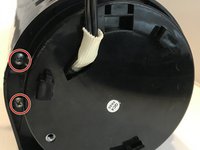
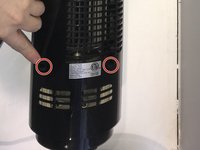
Remove the two 5 mm screws located on the outside of the case inside the holes using the Phillips #1 screwdriver.
-
-
-
Remove a single 5 mm screw on the outside cover of the fan using the Phillips #1 screwdriver.
-
Gently lift the top cover of the fan halfway to expose the single 5 mm screw. Remove this screw using the same Phillips #1 screwdriver.
-
-
-
Pinch the sides of the case to remove the case from the rest of the fan.
-
-
-
Remove the single 5 mm screw between the fan blade and the motor using the Phillips #1 screwdriver.
-
-
-
Remove the two 5 mm screws holding the fan blade in place using the Phillips #1 screwdriver.
-
-
-
Remove the fan blade from the device and clean it off before reassembling your device.
-
-






To reassemble your device, follow these instructions in reverse order.

Equipe

UMass Dartmouth, Team S2-G4, Riel Spring 2021 Membro de UMass Dartmouth, Team S2-G4, Riel Spring 2021
UMASSD-RIEL-S21S2G4
1 Membro
Autoria de 12 guias
