Ir para o conteúdo principal
Participe da comunidade de reparos - Criar conta

Nvidia Shield Joystick Replacement

Visualizações: 4,8 mil

Visualizar Estatísticas:

Últimas 24 horas:
2
Últimos 7 dias:
20
Últimos 30 dias:
96
Ao todo:
4.753
Comentários: 2

2 comments on steps.

Concluído: 4

4 pessoas marcaram este guia como "concluído". Será você o próximo?

Favorites: 2

2 pessoas favoritaram (e se inscreveram) neste guia. Você será o próximo?

Tempo necessário: 20 minutos
Dificuldade: Fácil
Nvidia Shield Joystick Replacement

Introdução

Ir para o passo 1 ↓

It's possible through normal wear and tear, or particularly vigorous gameplay, that your Nvidia Joystick will need to have its joystick board and/or thumb-sticks replaced to restore them to fully functional. The joystick board is what communicates the movements of the thumb-sticks to the computer or console which will then produce movement onscreen.

Repairs like these will save you money since these devices can become expensive, and keep repairable electronics out of landfills. By completing this repair, your joystick should be back to fully functional and more responsive, assuming the wear on the joystick board degraded with age and time.

To complete this repair, you'll only need the replacement parts and a screwdriver that fits a 6.5mm screw so, nothing fancy and no special knowledge is required.

O que você precisa

Ferramentas

    1. Nvidia Shield Joystick Replacement, Remove Front Panel: passo 1, imagem 1 %32 Nvidia Shield Joystick Replacement, Remove Front Panel: passo 1, imagem 2 %32 Nvidia Shield Joystick Replacement, Remove Front Panel: passo 1, imagem 3 %32
      • Remove the seven 6.4mm T5 Torx screws from the back panel.

      • Use the spudger to separate the front and back panels.

      Pergunte ao FixBot

      Comentar

    2. Nvidia Shield Joystick Replacement, Remove Green Grill: passo 2, imagem 1 %32 Nvidia Shield Joystick Replacement, Remove Green Grill: passo 2, imagem 2 %32
      • The green grill is not screwed in so it can be pulled right out.

      Pergunte ao FixBot

      Comentar

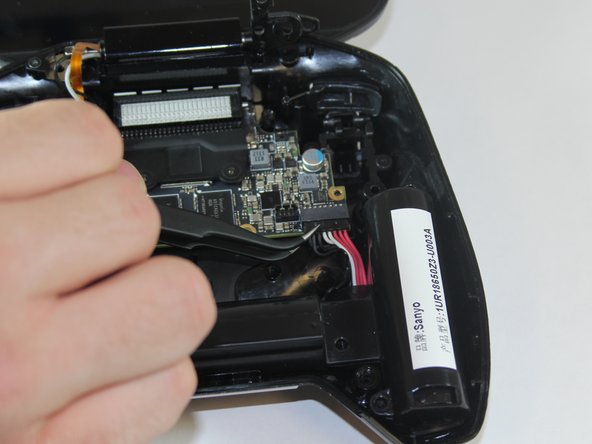
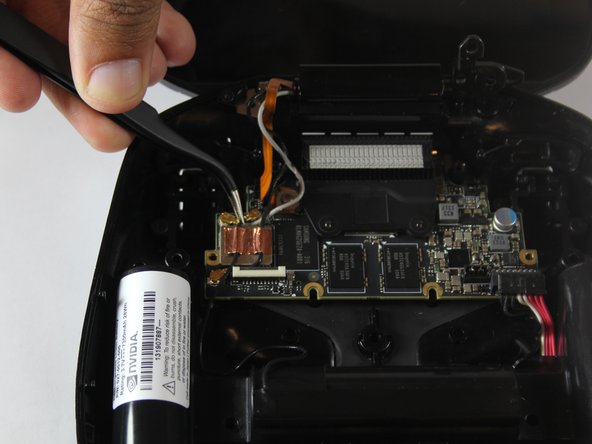
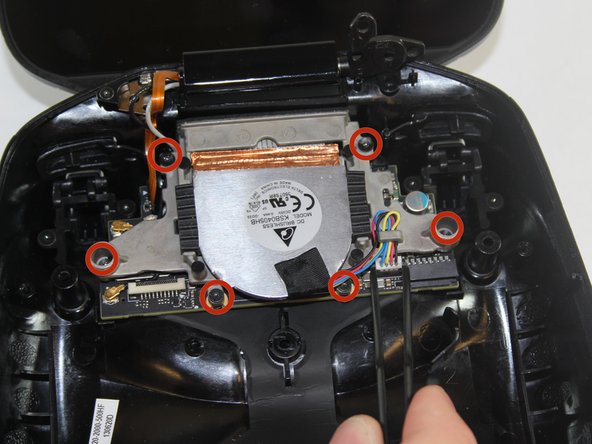
    3. Nvidia Shield Joystick Replacement, Remove Battery Cables: passo 3, imagem 1 %32 Nvidia Shield Joystick Replacement, Remove Battery Cables: passo 3, imagem 2 %32 Nvidia Shield Joystick Replacement, Remove Battery Cables: passo 3, imagem 3 %32
      • Remove the six 6.5mm T5 Torx screws.

      • Disconnect the power wires.

      • Peel back the copper tape and disconnect the black and white wires.

      Pergunte ao FixBot

      Comentar

    4. Nvidia Shield Joystick Replacement, Remove Battery Apparatus: passo 4, imagem 1 %32
      • Pull the battery apparatus out once all cables are removed.

      Pergunte ao FixBot

      Comentar

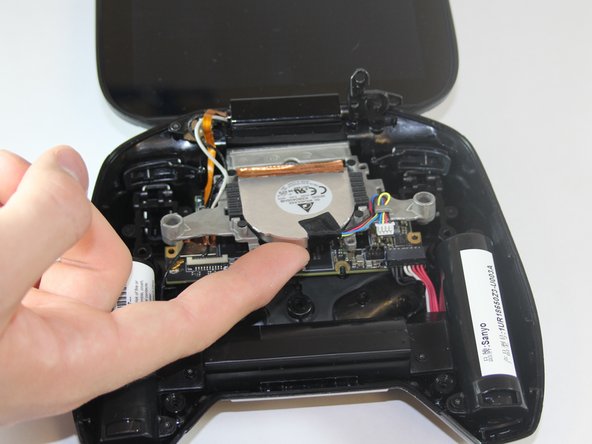
    1. Nvidia Shield Joystick Replacement, Removing Fan: passo 5, imagem 1 %32 Nvidia Shield Joystick Replacement, Removing Fan: passo 5, imagem 2 %32 Nvidia Shield Joystick Replacement, Removing Fan: passo 5, imagem 3 %32
      • Cooling is important for electronics, the last thing they want is to overheat.

      • Remove the two 7.3mm and four 8.4mm T5 Torx screws and disconnect the power cable.

      • Lift the fan free after the screws and cable are removed.

      Pergunte ao FixBot

      Comentar

    1. Nvidia Shield Joystick Replacement, Removing Logic Board: passo 6, imagem 1 %32 Nvidia Shield Joystick Replacement, Removing Logic Board: passo 6, imagem 2 %32 Nvidia Shield Joystick Replacement, Removing Logic Board: passo 6, imagem 3 %32
      • The large board under the back case is the motherboard.

      • Using your T5 Torx screwdriver, remove six screws from the motherboard—two 7.3 mm screws and four 8.4 mm screws.

      • Simply pull gently on the edges of the board, wiggling it if necessary so as not to damage the ports at the top of the board.

      Pergunte ao FixBot

      Comentar

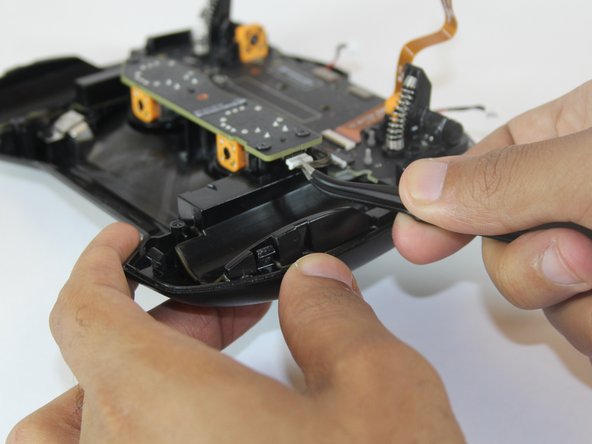
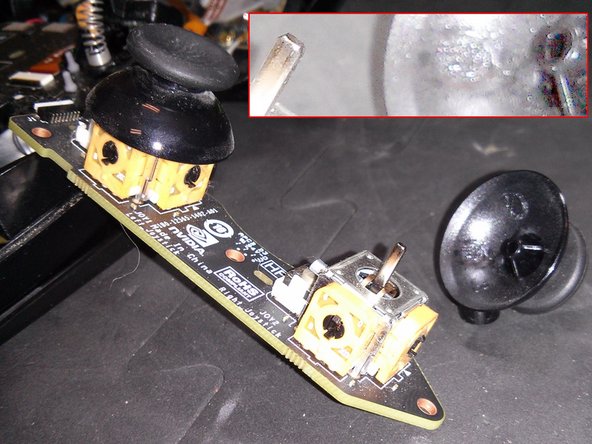
    1. Nvidia Shield Joystick Replacement, Removing Joysticks: passo 7, imagem 1 %32 Nvidia Shield Joystick Replacement, Removing Joysticks: passo 7, imagem 2 %32 Nvidia Shield Joystick Replacement, Removing Joysticks: passo 7, imagem 3 %32
      • Unscrew the 3 6.5mm screws from the Joystick board

      • Unplug the ribbon attached on the right hand side of the board

      • Once removed, the Joystick board will lift from the panel, allowing replacement

      • The thumb-Sticks can be pulled off of the metal pegs for replacement.

      Pergunte ao FixBot

      Comentar

Conclusão

To reassemble your device, follow these instructions in reverse order.

Cancelar: não concluí este guia.

4 outras pessoas executaram este guia.

Equipe

USF Tampa, Team 1-1, Hickman Fall 2014 Membro de USF Tampa, Team 1-1, Hickman Fall 2014

USFT-HICKMAN-F14S1G1

4 Membros

Autoria de 72 guias

0Comentários do guia

Comentar

Visualizações:

Últimas 24 horas: 2

Últimos 7 dias: 20

Últimos 30 dias: 96

Ao todo: 4,753