Ir para o conteúdo principal
Participe da comunidade de reparos - Criar conta

Nintendo DSi XL Upper Case Replacement

Visualizações: 15 mil

Visualizar Estatísticas:

Últimas 24 horas:
4
Últimos 7 dias:
22
Últimos 30 dias:
138
Ao todo:
15.483
Comentários: 18

18 comments on steps.

Concluído: 3

3 pessoas marcaram este guia como "concluído". Será você o próximo?

Favorites: 9

9 pessoas favoritaram (e se inscreveram) neste guia. Você será o próximo?

Tempo necessário: Nenhuma estimativa
Dificuldade: Moderado
Nintendo DSi XL Upper Case Replacement

Introdução

Ir para o passo 1 ↓

Customize the color of your DSi XL by replacing the upper case.

O que você precisa

Peças

Ferramentas

    1. Nintendo DSi XL Upper Case Replacement, Battery: passo 1, imagem 1 %32 Nintendo DSi XL Upper Case Replacement, Battery: passo 1, imagem 2 %32
      • Remove the two Phillips screws securing the battery cover to the back of the handheld console.

      • Lift the battery cover off the back of the DSi XL.

      Pergunte ao FixBot

      Comentar

    2. Nintendo DSi XL Upper Case Replacement: passo 2, imagem 1 %32
      • Lift the battery from the DSi XL.

      Pergunte ao FixBot

      Comentar

    1. Nintendo DSi XL Upper Case Replacement, Lower Case: passo 3, imagem 1 %32 Nintendo DSi XL Upper Case Replacement, Lower Case: passo 3, imagem 2 %32 Nintendo DSi XL Upper Case Replacement, Lower Case: passo 3, imagem 3 %32
      • Remove the four rubber screw covers on the lower case by prying them up with a push pin.

      Pergunte ao FixBot

      Comentar

    2. Nintendo DSi XL Upper Case Replacement: passo 4, imagem 1 %32
      • Remove the following seven Phillips screws that secure the lower case to the rest of the DSi XL:

      • Four silver 5.3 mm screws

      • Two black 5.3 mm screws

      • One black 2.5 mm screw

      Pergunte ao FixBot

      Comentar

    3. Nintendo DSi XL Upper Case Replacement: passo 5, imagem 1 %32 Nintendo DSi XL Upper Case Replacement: passo 5, imagem 2 %32 Nintendo DSi XL Upper Case Replacement: passo 5, imagem 3 %32
      • Turn the DSi XL over, and open the display.

      • Insert a spudger between the upper and lower case at the bottom left corner of the DSi.

      • Slide the spudger along the bottom edge of the upper case to release the latches securing the upper case to the lower case.

      Pergunte ao FixBot

      Comentar

    4. Nintendo DSi XL Upper Case Replacement: passo 6, imagem 1 %32 Nintendo DSi XL Upper Case Replacement: passo 6, imagem 2 %32
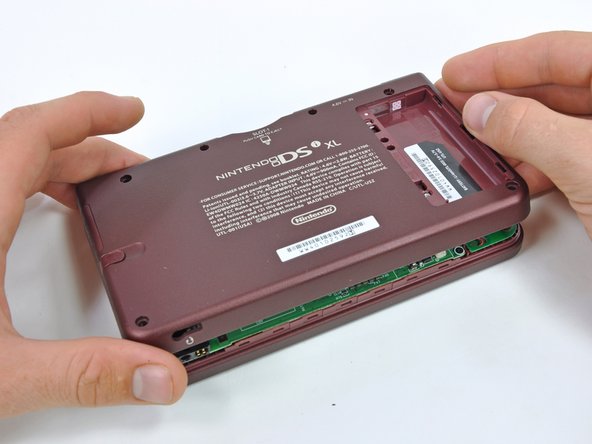
      • Close the display and turn the DSi XL over.

      • Lift the lower case from the front edge.

      • Rotate the lower case away from the DSi.

      • The lower case cannot be completely removed yet, since it is still connected to the motherboard.

      Pergunte ao FixBot

      Comentar

    5. Nintendo DSi XL Upper Case Replacement: passo 7, imagem 1 %32 Nintendo DSi XL Upper Case Replacement: passo 7, imagem 2 %32
      • Using a spudger, pry the SD card/right shoulder button connector off its socket.

      • Pry the volume button/left shoulder button connector off its socket on the motherboard with a spudger.

      Pergunte ao FixBot

      Comentar

    1. Nintendo DSi XL Upper Case Replacement, Motherboard: passo 8, imagem 1 %32
      • Use a spudger to pry the microphone cable off the motherboard.

      • Pry from underneath the cable.

      Pergunte ao FixBot

      Comentar

    2. Nintendo DSi XL Upper Case Replacement: passo 9, imagem 1 %32 Nintendo DSi XL Upper Case Replacement: passo 9, imagem 2 %32
      • Using the flat end of a spudger, flip up the retaining flap on the camera ribbon ZIF connector.

      • Use the pointed end of a spudger to pull the camera ribbon from the ZIF connector.

      Pergunte ao FixBot

      Comentar

    3. Nintendo DSi XL Upper Case Replacement: passo 10, imagem 1 %32 Nintendo DSi XL Upper Case Replacement: passo 10, imagem 2 %32
      • Using the flat end of a spudger, flip up the retaining flap on the touchscreen cable ZIF connector.

      • With the pointed end of the spudger, pull the touchscreen cable from its connector on the motherboard.

      Pergunte ao FixBot

      Comentar

    4. Nintendo DSi XL Upper Case Replacement: passo 11, imagem 1 %32 Nintendo DSi XL Upper Case Replacement: passo 11, imagem 2 %32
      • Using the flat end of a spudger, flip up the retaining flap on the backlight cable ZIF connector.

      • With the pointed end of the spudger, pull the backlight cable from its connector on the motherboard.

      Pergunte ao FixBot

      Comentar

    5. Nintendo DSi XL Upper Case Replacement: passo 12, imagem 1 %32 Nintendo DSi XL Upper Case Replacement: passo 12, imagem 2 %32
      • Using the flat end of a spudger, flip up the retaining flap on the lower display data cable ZIF connector.

      • With the pointed end of the spudger, pull the lower display data cable from its connector on the motherboard.

      Pergunte ao FixBot

      Comentar

    6. Nintendo DSi XL Upper Case Replacement: passo 13, imagem 1 %32 Nintendo DSi XL Upper Case Replacement: passo 13, imagem 2 %32
      • Using the flat end of a spudger, flip up the retaining flap on the ZIF connector for the D-Pad/power button cable.

      • With the pointed end of the spudger, pull the D-Pad/power button cable from its connector on the motherboard.

      Pergunte ao FixBot

      Comentar

    7. Nintendo DSi XL Upper Case Replacement: passo 14, imagem 1 %32
      • Using the flat end of the spudger, pry the battery cable up off its socket on the motherboard.

      Pergunte ao FixBot

      Comentar

    8. Nintendo DSi XL Upper Case Replacement: passo 15, imagem 1 %32
      • Remove the screws securing the motherboard to the upper case:

      • A single 2.5 mm silver Phillips screw

      • Four 3.7 mm black Phillips screws

      Pergunte ao FixBot

      Comentar

    9. Nintendo DSi XL Upper Case Replacement: passo 16, imagem 1 %32
      • Deroute the microphone and antenna cables through the slot in the motherboard.

      Pergunte ao FixBot

      Comentar

    10. Nintendo DSi XL Upper Case Replacement: passo 17, imagem 1 %32 Nintendo DSi XL Upper Case Replacement: passo 17, imagem 2 %32
      • Rotate the motherboard off the lower case.

      • The motherboard cannot be completely removed yet. It is still attached by the upper LCD's display data ribbon cable.

      Pergunte ao FixBot

      Comentar

    11. Nintendo DSi XL Upper Case Replacement: passo 18, imagem 1 %32 Nintendo DSi XL Upper Case Replacement: passo 18, imagem 2 %32
      • Using the flat end of a spudger, flip up the retaining flap on the upper display data cable ZIF connector.

      • With the pointed end of the spudger, pull the upper display data cable from its connector on the underside of the motherboard.

      • The motherboard is now free from the upper case.

      Pergunte ao FixBot

      Comentar

    1. Nintendo DSi XL Upper Case Replacement, Lower Display Assembly: passo 19, imagem 1 %32 Nintendo DSi XL Upper Case Replacement, Lower Display Assembly: passo 19, imagem 2 %32
      • With the console still upside-down, open the DSi XL slightly.

      • Push the lower display away from the upper case.

      • Remove the lower display from the DSi XL.

      Pergunte ao FixBot

      Comentar

    1. Nintendo DSi XL Upper Case Replacement, Rear Bezel: passo 20, imagem 1 %32 Nintendo DSi XL Upper Case Replacement, Rear Bezel: passo 20, imagem 2 %32 Nintendo DSi XL Upper Case Replacement, Rear Bezel: passo 20, imagem 3 %32
      • Turn the DSi XL over and open the display.

      • When re-assembling the device, be sure to re-install the ABXY and Start/Select buttons, as they are likely to fall out once the handheld console is turned over.

      • Use a pushpin to remove the four plastic screw covers on the front bezel.

      Pergunte ao FixBot

      Comentar

    2. Nintendo DSi XL Upper Case Replacement: passo 21, imagem 1 %32
      • Remove the four 3.5 mm silver Phillips screws securing the rear bezel to the front bezel.

      Pergunte ao FixBot

      Comentar

    3. Nintendo DSi XL Upper Case Replacement: passo 22, imagem 1 %32 Nintendo DSi XL Upper Case Replacement: passo 22, imagem 2 %32
      • Using two hands, gently slide the rear bezel upwards.

      • The rear bezel will move only about 2 mm.

      Pergunte ao FixBot

      Comentar

    4. Nintendo DSi XL Upper Case Replacement: passo 23, imagem 1 %32 Nintendo DSi XL Upper Case Replacement: passo 23, imagem 2 %32
      • Insert a spudger into the gap between the front and rear bezel.

      • Rotate the spudger away from the DSi XL, prying the two bezels apart.

      Pergunte ao FixBot

      Comentar

    5. Nintendo DSi XL Upper Case Replacement: passo 24, imagem 1 %32 Nintendo DSi XL Upper Case Replacement: passo 24, imagem 2 %32
      • In the same manner as described above, continue prying along the top edge of the front and rear bezels.

      Pergunte ao FixBot

      Comentar

    6. Nintendo DSi XL Upper Case Replacement: passo 25, imagem 1 %32
      • Separate the rear bezel from the front bezel.

      • Do not attempt to completely remove the rear bezel yet. It is still attached to the front bezel by the rear-facing camera.

      Pergunte ao FixBot

      Comentar

    7. Nintendo DSi XL Upper Case Replacement: passo 26, imagem 1 %32
      • Using the flat end of a spudger, pry the rear camera off the rear bezel.

      • Remove the rear bezel.

      Pergunte ao FixBot

      Comentar

    1. Nintendo DSi XL Upper Case Replacement, Microphone: passo 27, imagem 1 %32 Nintendo DSi XL Upper Case Replacement, Microphone: passo 27, imagem 2 %32
      • Remove the Phillips screw holding the metal securing bracket in place.

      • Lift the metal bracket off the camera.

      Pergunte ao FixBot

      Comentar

    2. Nintendo DSi XL Upper Case Replacement: passo 28, imagem 1 %32 Nintendo DSi XL Upper Case Replacement: passo 28, imagem 2 %32
      • Use the tip of a spudger to lift the microphone from its seat on the front display bezel.

      Pergunte ao FixBot

      Comentar

    3. Nintendo DSi XL Upper Case Replacement: passo 29, imagem 1 %32
      • De-route the microphone cable.

      Pergunte ao FixBot

      Comentar

    4. Nintendo DSi XL Upper Case Replacement: passo 30, imagem 1 %32 Nintendo DSi XL Upper Case Replacement: passo 30, imagem 2 %32 Nintendo DSi XL Upper Case Replacement: passo 30, imagem 3 %32
      Ferramenta utilizada neste passo:
      Tweezers
      $4.99
      • Pull the microphone cable through the right hinge connecting the front bezel and upper case.

      • Use the pointed end of a spudger to guide the connector at the end of the microphone cable through the hinge.

      • To replace the microphone, use a pair of tweezers to guide the connector through the hinge.

      Pergunte ao FixBot

      Comentar

    1. Nintendo DSi XL Upper Case Replacement, Wi-Fi Antenna: passo 31, imagem 1 %32 Nintendo DSi XL Upper Case Replacement, Wi-Fi Antenna: passo 31, imagem 2 %32
      • Lift the Wi-Fi antenna off the front display bezel.

      • De-route the Wi-Fi antenna cable from its grooves at the bottom of the front display bezel.

      Pergunte ao FixBot

      Comentar

    2. Nintendo DSi XL Upper Case Replacement: passo 32, imagem 1 %32 Nintendo DSi XL Upper Case Replacement: passo 32, imagem 2 %32
      • Pull the Wi-Fi antenna cable through the right hinge connecting the front bezel and upper case.

      Pergunte ao FixBot

      Comentar

    1. Nintendo DSi XL Upper Case Replacement, Upper Display Assembly: passo 33, imagem 1 %32 Nintendo DSi XL Upper Case Replacement, Upper Display Assembly: passo 33, imagem 2 %32
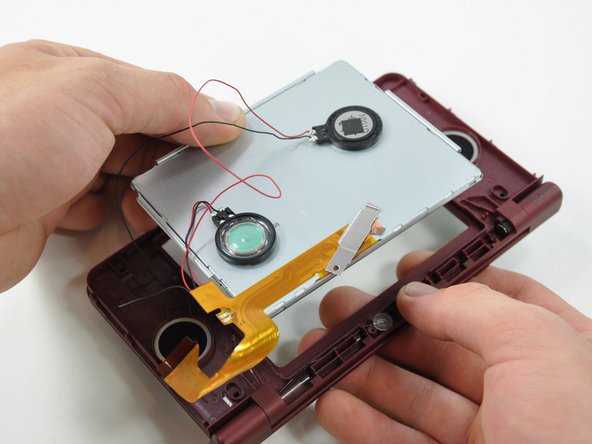
      • Lift both of the speakers from their seats on the front display bezel.

      Pergunte ao FixBot

      Comentar

    2. Nintendo DSi XL Upper Case Replacement: passo 34, imagem 1 %32
      • De-route the speaker wires that run above the upper display screen.

      Pergunte ao FixBot

      Comentar

    3. Nintendo DSi XL Upper Case Replacement: passo 35, imagem 1 %32 Nintendo DSi XL Upper Case Replacement: passo 35, imagem 2 %32
      • Remove the upper display assembly.

      Pergunte ao FixBot

      Comentar

    1. Nintendo DSi XL Upper Case Replacement, Upper Case: passo 36, imagem 1 %32 Nintendo DSi XL Upper Case Replacement, Upper Case: passo 36, imagem 2 %32
      • Remove the seven 2.5 mm silver screws securing the power board to the upper case.

      • Lift the power board off the upper case.

      Pergunte ao FixBot

      Comentar

    2. Nintendo DSi XL Upper Case Replacement: passo 37, imagem 1 %32 Nintendo DSi XL Upper Case Replacement: passo 37, imagem 2 %32
      • Open the case slightly.

      • Push the directional pad up through the upper case and remove it from the upper case.

      • Push the power button up through the upper case, and remove it from the upper case.

      Pergunte ao FixBot

      Comentar

    3. Nintendo DSi XL Upper Case Replacement: passo 38, imagem 1 %32 Nintendo DSi XL Upper Case Replacement: passo 38, imagem 2 %32
      • Remove the LED diffuser and black retaining bracket by turning the upper case upside-down and letting both pieces fall into your hand.

      Pergunte ao FixBot

      Comentar

    4. Nintendo DSi XL Upper Case Replacement: passo 39, imagem 1 %32 Nintendo DSi XL Upper Case Replacement: passo 39, imagem 2 %32
      • The front bezel is held in place by the clutch hinge on the left side of the DSi Xl=L.

      • Using the tip of the spudger, push the clutch hinge to the left.

      • You will hear a "click" when the clutch has been completely displaced. Some force will be required.

      Pergunte ao FixBot

      Comentar

    5. Nintendo DSi XL Upper Case Replacement: passo 40, imagem 1 %32 Nintendo DSi XL Upper Case Replacement: passo 40, imagem 2 %32
      • Lift the front bezel off of the upper case, tilting the left side of the front bezel away from the upper case first.

      Pergunte ao FixBot

      Comentar

    6. Nintendo DSi XL Upper Case Replacement: passo 41, imagem 1 %32
      • Remove the hollow hinge pin from the right side of the DSi XL.

      • The upper case remains.

      Pergunte ao FixBot

      Comentar

Conclusão

To reassemble your device, follow these instructions in reverse order.

Cancelar: não concluí este guia.

3 outras pessoas executaram este guia.

Brett Hartt

Membro desde: 04/12/10

132.585 Reputação

Autoria de 144 guias

Equipe

iFixit Membro de iFixit

Staff

121 Membros

Autoria de 72.907 guias

0Comentários do guia

Comentar

Visualizações:

Últimas 24 horas: 4

Últimos 7 dias: 22

Últimos 30 dias: 138

Ao todo: 15,483