Ir para o conteúdo principal
Participe da comunidade de reparos - Criar conta

Nintendo DSi XL D-pad Replacement

O que você precisa

  1. Nintendo DSi XL D-pad Replacement, Battery: passo 1, imagem 1 %32 Nintendo DSi XL D-pad Replacement, Battery: passo 1, imagem 2 %32
    • Remove the two Phillips screws securing the battery cover to the back of the handheld console.

    • Lift the battery cover off the back of the DSi XL.

    Pergunte ao FixBot

    Comentar

  2. Nintendo DSi XL D-pad Replacement: passo 2, imagem 1 %32
    • Lift the battery from the DSi XL.

    Pergunte ao FixBot

    Comentar

  3. Nintendo DSi XL D-pad Replacement, Lower Case: passo 3, imagem 1 %32 Nintendo DSi XL D-pad Replacement, Lower Case: passo 3, imagem 2 %32 Nintendo DSi XL D-pad Replacement, Lower Case: passo 3, imagem 3 %32
    • Remove the four rubber screw covers on the lower case by prying them up with a push pin.

    Pergunte ao FixBot

    Comentar

  4. Nintendo DSi XL D-pad Replacement: passo 4, imagem 1 %32
    • Remove the following seven Phillips screws that secure the lower case to the rest of the DSi XL:

    • Four silver 5.3 mm screws

    • Two black 5.3 mm screws

    • One black 2.5 mm screw

    Pergunte ao FixBot

    Comentar

  5. Nintendo DSi XL D-pad Replacement: passo 5, imagem 1 %32 Nintendo DSi XL D-pad Replacement: passo 5, imagem 2 %32 Nintendo DSi XL D-pad Replacement: passo 5, imagem 3 %32
    • Turn the DSi XL over, and open the display.

    • Insert a spudger between the upper and lower case at the bottom left corner of the DSi.

    • Slide the spudger along the bottom edge of the upper case to release the latches securing the upper case to the lower case.

    Pergunte ao FixBot

    Comentar

  6. Nintendo DSi XL D-pad Replacement: passo 6, imagem 1 %32 Nintendo DSi XL D-pad Replacement: passo 6, imagem 2 %32
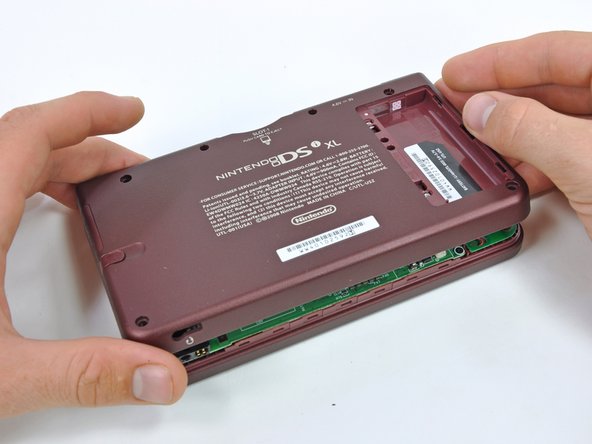
    • Close the display and turn the DSi XL over.

    • Lift the lower case from the front edge.

    • Rotate the lower case away from the DSi.

    • The lower case cannot be completely removed yet, since it is still connected to the motherboard.

    Pergunte ao FixBot

    Comentar

  7. Nintendo DSi XL D-pad Replacement: passo 7, imagem 1 %32 Nintendo DSi XL D-pad Replacement: passo 7, imagem 2 %32
    • Using a spudger, pry the SD card/right shoulder button connector off its socket.

    • Pry the volume button/left shoulder button connector off its socket on the motherboard with a spudger.

    Pergunte ao FixBot

    Comentar

  8. Nintendo DSi XL D-pad Replacement, Power Board: passo 8, imagem 1 %32 Nintendo DSi XL D-pad Replacement, Power Board: passo 8, imagem 2 %32
    • Using the flat end of a spudger, flip up the retaining flap on the ZIF connector for the D-pad/power button cable.

    • With the pointed end of the spudger, pull the D-pad/power button cable from its connector on the motherboard.

    Pergunte ao FixBot

    Comentar

  9. Nintendo DSi XL D-pad Replacement: passo 9, imagem 1 %32
    • Using the flat end of the spudger, carefully pry the battery cable out of its socket on the motherboard.

    • Use caution, as the wires are very fragile and could come out of the connector if pulled on too hard.

    Pergunte ao FixBot

    Comentar

  10. Nintendo DSi XL D-pad Replacement: passo 10, imagem 1 %32 Nintendo DSi XL D-pad Replacement: passo 10, imagem 2 %32
    • Remove the seven 2.5 mm silver screws securing the power board to the upper case.

    • Lift the power board off the upper case.

    Pergunte ao FixBot

    Comentar

  11. Nintendo DSi XL D-pad Replacement, D-pad: passo 11, imagem 1 %32
    • Lift the rubber pad off the back of the D-pad.

    Pergunte ao FixBot

    Comentar

  12. Nintendo DSi XL D-pad Replacement: passo 12, imagem 1 %32 Nintendo DSi XL D-pad Replacement: passo 12, imagem 2 %32
    • Open the display slightly, and push the D-pad up through the upper case.

    • Lift the D-Pad from the handheld device.

    Pergunte ao FixBot

    Comentar

Conclusão

To reassemble your device, follow these instructions in reverse order.

Cancelar: não concluí este guia.

10 outras pessoas executaram este guia.

Brett Hartt

Membro desde: 04/12/10

132.153 Reputação

Autoria de 144 guias

Equipe

iFixit Membro de iFixit

Staff

122 Membros

Autoria de 25.860 guias

1Comentário do guia

Be very careful removing the screws - a Google search returns page after page of people who stripped their screws trying to remove the lower case or the power board. My lower case may be permanently attached now. If I did it over again, I would consider dripping a tiny amount of WD40 onto the screws and letting it seep in for a day before I tried removing them...

Nick Noble - Responder Compartilhar

Comentar

Visualizações:

Últimas 24 horas: 8

Últimos 7 dias: 39

Últimos 30 dias: 225

Ao todo: 14,375