Ir para o conteúdo principal
Participe da comunidade de reparos - Criar conta

Motorola i850 Battery Replacement

  1. Motorola i850 Battery Replacement, Disassembling Motorola i850 Back Cover: passo 1, imagem 1 %32
    • Use your thumb to slide the back cover locker away from the antenna.

  2. Motorola i850 Battery Replacement: passo 2, imagem 1 %32 Motorola i850 Battery Replacement: passo 2, imagem 2 %32
    • Slide the back cover towards the antenna while lifting the cover away from the phone.

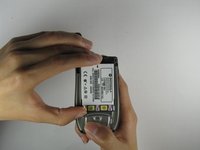
  3. Motorola i850 Battery Replacement, Battery: passo 3, imagem 1 %32
    • Place your thumb on the indicated corner while stabilizing the phone and the upper portion of the battery with your forefinger.

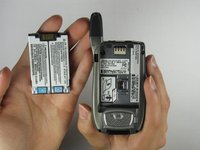
  4. Motorola i850 Battery Replacement: passo 4, imagem 1 %32 Motorola i850 Battery Replacement: passo 4, imagem 2 %32
    • Lift the battery out of the phone while pushing it towards the antenna.

Conclusão

To reassemble your device, follow these instructions in reverse order.

Alex Jones

Membro desde: 04/09/10

1 Reputação

Autoria de 3 guias

Equipe

Cal Poly, Team 34-56, Forte Spring 2010 Membro de Cal Poly, Team 34-56, Forte Spring 2010

CPSU-FORTE-S10S34G56

4 Membros

Autoria de 10 guias

0Comentários do guia

Comentar

Visualizações:

Últimas 24 horas: 1

Últimos 7 dias: 5

Últimos 30 dias: 26

Ao todo: 1,763