Ir para o conteúdo principal

Mac Mini Mid 2011 Hard Drive Replacement

Pré-requisito somente
Este é um guia somente para pré-requisitos! Este guia faz parte de outro procedimento e não deve ser usado sozinho.
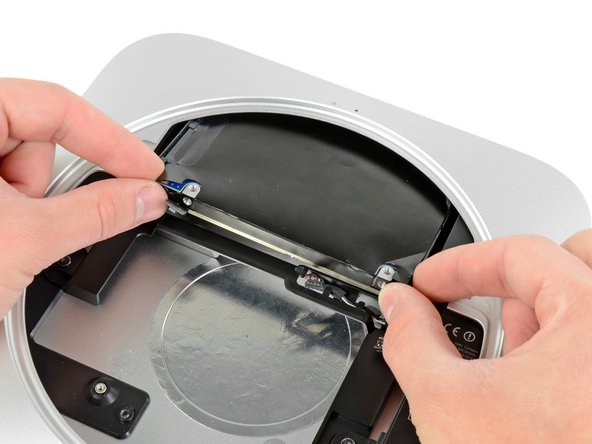
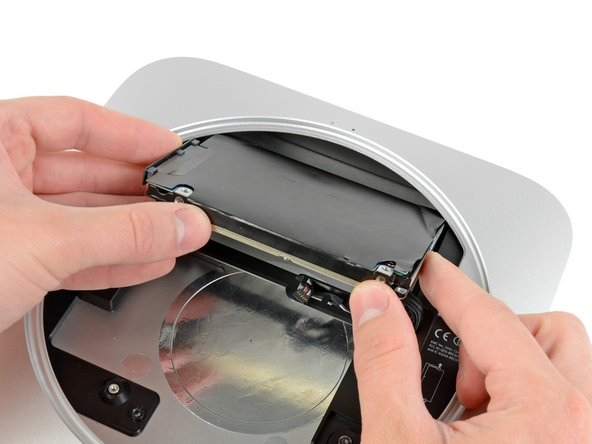
  1. Mac Mini Mid 2011 Hard Drive Replacement, Hard Drive: passo 1, imagem 1 %32 Mac Mini Mid 2011 Hard Drive Replacement, Hard Drive: passo 1, imagem 2 %32
    • Pull the hard drive away from the front edge of the mini and remove it from the outer case.

    • During reassembly, there are two pins on the inside edge of the hard drive that fit into the case. The holes have rubber grommets around them, so it may be difficult to tell when you have seated the hard drive correctly.

    • There are two pairs of holes in the case. Insert the pins into the holes closest to the bottom of the case.

Conclusão

To reassemble your device, follow these instructions in reverse order.

0Comentários do guia

Comentar

Visualizações:

Últimas 24 horas: 1

Últimos 7 dias: 1

Últimos 30 dias: 6

Ao todo: 1,114