Ir para o conteúdo principal
Participe da comunidade de reparos - Criar conta

Logitech UE Boom USB Port Replacement

O que você precisa

  1. Logitech UE Boom USB Port Replacement, D-ring: passo 1, imagem 1 %32
    • Turn the device over. The D-ring will be on the left face of the speaker when viewing the device from this orientation.

    Pergunte ao FixBot
  2. Logitech UE Boom USB Port Replacement: passo 2, imagem 1 %32 Logitech UE Boom USB Port Replacement: passo 2, imagem 2 %32
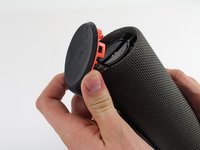
    • Lift the handle on the D-ring and unscrew it.

    • Remove the D-ring.

    Pergunte ao FixBot
  3. Logitech UE Boom USB Port Replacement, Bluetooth Adapter: passo 3, imagem 1 %32
    • Any repairs made from this point forward will void your device's warranty.

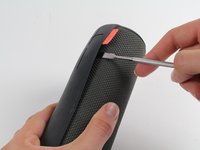
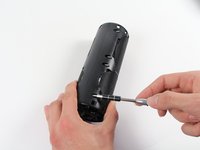
    • Holding the speaker upright, wedge the metal spudger in between the casing and the speaker. Gently pry open the tabs as they are easily broken.

    Pergunte ao FixBot
  4. Logitech UE Boom USB Port Replacement: passo 4, imagem 1 %32 Logitech UE Boom USB Port Replacement: passo 4, imagem 2 %32 Logitech UE Boom USB Port Replacement: passo 4, imagem 3 %32
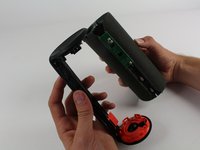
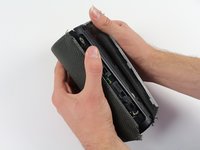
    • Find the part of the casing that covers the volume controls. Wedge the metal spudger under this and pry open all of the tabs as in the previous step.

    • Repeat for the bottom of the speaker and pry the casing open with your fingers.

    Pergunte ao FixBot
  5. Logitech UE Boom USB Port Replacement: passo 5, imagem 1 %32 Logitech UE Boom USB Port Replacement: passo 5, imagem 2 %32
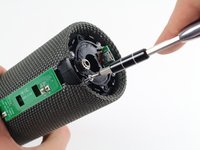
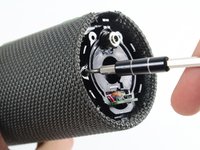
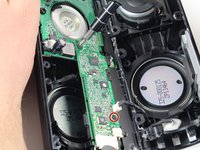
    • Using the Phillips J0 head screwdriver, unscrew the four silver 9 mm screws.

    • Do the same for the two black 7 mm screws.

    Pergunte ao FixBot
  6. Logitech UE Boom USB Port Replacement: passo 6, imagem 1 %32 Logitech UE Boom USB Port Replacement: passo 6, imagem 2 %32 Logitech UE Boom USB Port Replacement: passo 6, imagem 3 %32
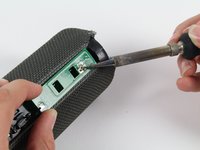
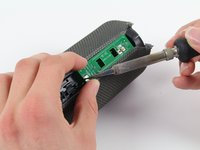
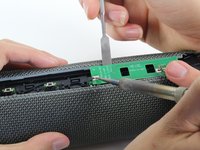
    • This next step involves the use of a hot soldering iron. Remember to be careful during this step since it can be easy to burn yourself.

    • Using a soldering iron, de-solder the two ends of the switch plate. Desolder the two terminals on headphone jack side first, as the middle connection is notched and should be slid out when molten.

    Pergunte ao FixBot
  7. Logitech UE Boom USB Port Replacement: passo 7, imagem 1 %32
    • With the switch plate disconnected, remove it and your device should now look like this.

    Pergunte ao FixBot
  8. Logitech UE Boom USB Port Replacement, Lithium Battery: passo 8, imagem 1 %32
    • With a metal spudger, pry open the tabs on the speaker sleeve along the length of the speaker.

    Pergunte ao FixBot
  9. Logitech UE Boom USB Port Replacement: passo 9, imagem 1 %32
    • Use a plastic opening tool to pry the sleeve off from the bottom of the speaker.

    Pergunte ao FixBot
  10. Logitech UE Boom USB Port Replacement: passo 10, imagem 1 %32 Logitech UE Boom USB Port Replacement: passo 10, imagem 2 %32 Logitech UE Boom USB Port Replacement: passo 10, imagem 3 %32
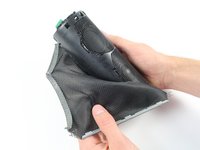
    • Peel off the sleeve.

    Pergunte ao FixBot
  11. Logitech UE Boom USB Port Replacement: passo 11, imagem 1 %32 Logitech UE Boom USB Port Replacement: passo 11, imagem 2 %32
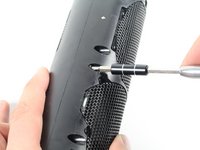
    • Use a Phillips 1 screwdriver to unscrew the eight black 14 mm screws along the length of the casing.

    Pergunte ao FixBot
  12. Logitech UE Boom USB Port Replacement: passo 12, imagem 1 %32 Logitech UE Boom USB Port Replacement: passo 12, imagem 2 %32
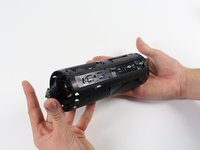
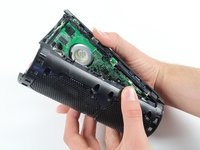
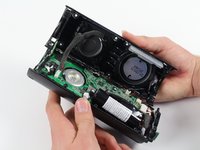
    • With the screws removed, pry open the casing to be able to get to the components inside.

    • Try prying the case open from one of the ends if that is easier.

    Pergunte ao FixBot
  13. Logitech UE Boom USB Port Replacement: passo 13, imagem 1 %32 Logitech UE Boom USB Port Replacement: passo 13, imagem 2 %32
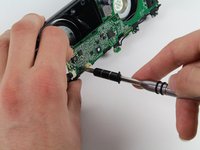
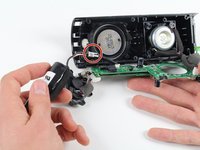
    • With a Phillips #00 screwdriver, unscrew two 5.6 mm screws from the rectangular shaped circuit board.

    Pergunte ao FixBot
  14. Logitech UE Boom USB Port Replacement: passo 14, imagem 1 %32
    • With the Phillips #2 screwdriver, unscrew the 9.9 mm screw from the larger circuit board surrounding the speaker.

    Pergunte ao FixBot
  15. Logitech UE Boom USB Port Replacement: passo 15, imagem 1 %32
    • Once all of the screws are gone, you should be able to remove the circuit boards and find the battery.

    Pergunte ao FixBot
  16. Logitech UE Boom USB Port Replacement: passo 16, imagem 1 %32 Logitech UE Boom USB Port Replacement: passo 16, imagem 2 %32
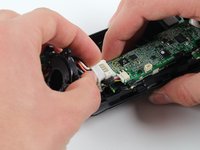
    • Remove the battery by pulling it from the terminal as marked in the picture.

    Pergunte ao FixBot
  17. Logitech UE Boom USB Port Replacement, USB Port: passo 17, imagem 1 %32 Logitech UE Boom USB Port Replacement, USB Port: passo 17, imagem 2 %32
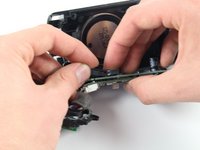
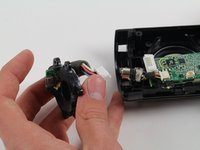
    • Finally, after opening the speaker, locate the USB plate on the left face of the speaker and remove it from the motherboard.

    Pergunte ao FixBot
Conclusão

To reassemble your device, follow these instructions in reverse order.

9 outras pessoas executaram este guia.

Sean Reilly

Membro desde: 10/01/15

1.772 Reputação

Autoria de 2 guias

Equipe

Cal Poly, Team 4-1, Maness Fall 2015 Membro de Cal Poly, Team 4-1, Maness Fall 2015

CPSU-MANESS-F15S4G1

4 Membros

Autoria de 22 guias

13Comentários do guia

Hello,

does anyone know where to get new usb port, the logitech support didn´t really help.

cheers marius

kok0dora94 - Responder Compartilhar
Same question as above, where can i buy a replacement USB port?

Corbett Hix - Responder Compartilhar
i found 10 of them on ebay for 3-4 dollars

johnsonjohnsonalexalex - Responder Compartilhar

Hi there , can you give me a link to Ebay where to find this port, thanks

katiecrow - Responder Compartilhar

can you send me a link on ebay where to find this replacement port , thanks

katiecrow - Responder Compartilhar

Comentar

Visualizações:

Últimas 24 horas: 4

Últimos 7 dias: 40

Últimos 30 dias: 187

Ao todo: 38,379