Ir para o conteúdo principal
Participe da comunidade de reparos - Criar conta

Logitech UE Boom Lithium Battery Replacement

O que você precisa

  1. Logitech UE Boom Lithium Battery Replacement, D-ring: passo 1, imagem 1 %32
    • Turn the device over. The D-ring will be on the left face of the speaker when viewing the device from this orientation.

    Pergunte ao FixBot

    Comentar

  2. Logitech UE Boom Lithium Battery Replacement: passo 2, imagem 1 %32 Logitech UE Boom Lithium Battery Replacement: passo 2, imagem 2 %32
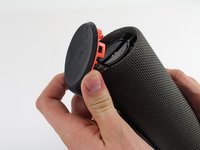
    • Lift the handle on the D-ring and unscrew it.

    • Remove the D-ring.

    Pergunte ao FixBot

    Comentar

  3. Logitech UE Boom Lithium Battery Replacement, Bluetooth Adapter: passo 3, imagem 1 %32
    • Any repairs made from this point forward will void your device's warranty.

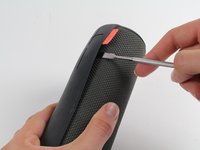
    • Holding the speaker upright, wedge the metal spudger in between the casing and the speaker. Gently pry open the tabs as they are easily broken.

    Pergunte ao FixBot

    Comentar

  4. Logitech UE Boom Lithium Battery Replacement: passo 4, imagem 1 %32 Logitech UE Boom Lithium Battery Replacement: passo 4, imagem 2 %32 Logitech UE Boom Lithium Battery Replacement: passo 4, imagem 3 %32
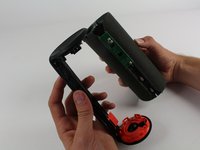
    • Find the part of the casing that covers the volume controls. Wedge the metal spudger under this and pry open all of the tabs as in the previous step.

    • Repeat for the bottom of the speaker and pry the casing open with your fingers.

    Pergunte ao FixBot

    Comentar

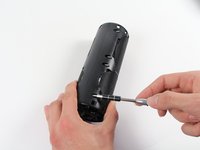
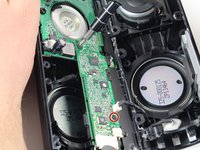
  5. Logitech UE Boom Lithium Battery Replacement: passo 5, imagem 1 %32 Logitech UE Boom Lithium Battery Replacement: passo 5, imagem 2 %32
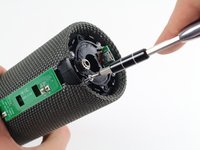
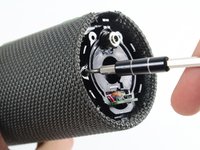
    • Using the Phillips J0 head screwdriver, unscrew the four silver 9 mm screws.

    • Do the same for the two black 7 mm screws.

    Pergunte ao FixBot

    Comentar

  6. Logitech UE Boom Lithium Battery Replacement: passo 6, imagem 1 %32 Logitech UE Boom Lithium Battery Replacement: passo 6, imagem 2 %32 Logitech UE Boom Lithium Battery Replacement: passo 6, imagem 3 %32
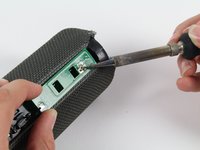
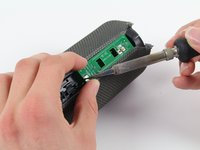
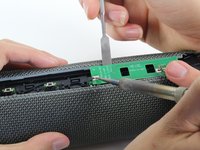
    • This next step involves the use of a hot soldering iron. Remember to be careful during this step since it can be easy to burn yourself.

    • Using a soldering iron, de-solder the two ends of the switch plate. Desolder the two terminals on headphone jack side first, as the middle connection is notched and should be slid out when molten.

    Pergunte ao FixBot

    Comentar

  7. Logitech UE Boom Lithium Battery Replacement: passo 7, imagem 1 %32
    • With the switch plate disconnected, remove it and your device should now look like this.

    Pergunte ao FixBot

    Comentar

  8. Logitech UE Boom Lithium Battery Replacement, Lithium Battery: passo 8, imagem 1 %32
    • With a metal spudger, pry open the tabs on the speaker sleeve along the length of the speaker.

    Pergunte ao FixBot

    Comentar

  9. Logitech UE Boom Lithium Battery Replacement: passo 9, imagem 1 %32
    • Use a plastic opening tool to pry the sleeve off from the bottom of the speaker.

    Pergunte ao FixBot

    Comentar

  10. Logitech UE Boom Lithium Battery Replacement: passo 10, imagem 1 %32 Logitech UE Boom Lithium Battery Replacement: passo 10, imagem 2 %32 Logitech UE Boom Lithium Battery Replacement: passo 10, imagem 3 %32
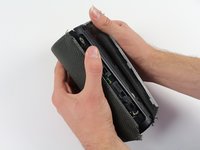
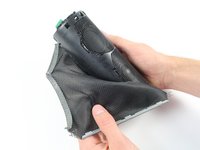
    • Peel off the sleeve.

    Pergunte ao FixBot

    Comentar

  11. Logitech UE Boom Lithium Battery Replacement: passo 11, imagem 1 %32 Logitech UE Boom Lithium Battery Replacement: passo 11, imagem 2 %32
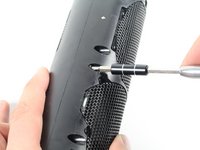
    • Use a Phillips 1 screwdriver to unscrew the eight black 14 mm screws along the length of the casing.

    Pergunte ao FixBot

    Comentar

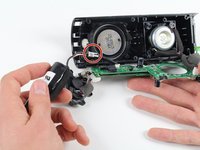
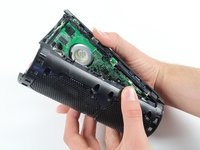
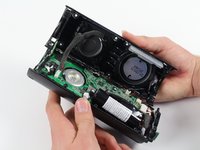
  12. Logitech UE Boom Lithium Battery Replacement: passo 12, imagem 1 %32 Logitech UE Boom Lithium Battery Replacement: passo 12, imagem 2 %32
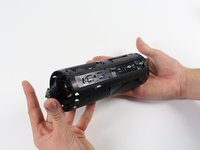
    • With the screws removed, pry open the casing to be able to get to the components inside.

    • Try prying the case open from one of the ends if that is easier.

    Pergunte ao FixBot

    Comentar

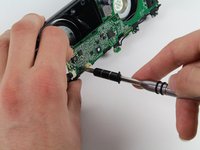
  13. Logitech UE Boom Lithium Battery Replacement: passo 13, imagem 1 %32 Logitech UE Boom Lithium Battery Replacement: passo 13, imagem 2 %32
    • With a Phillips #00 screwdriver, unscrew two 5.6 mm screws from the rectangular shaped circuit board.

    Pergunte ao FixBot

    Comentar

  14. Logitech UE Boom Lithium Battery Replacement: passo 14, imagem 1 %32
    • With the Phillips #2 screwdriver, unscrew the 9.9 mm screw from the larger circuit board surrounding the speaker.

    Pergunte ao FixBot

    Comentar

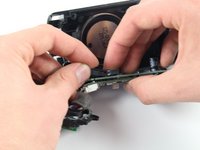
  15. Logitech UE Boom Lithium Battery Replacement: passo 15, imagem 1 %32
    • Once all of the screws are gone, you should be able to remove the circuit boards and find the battery.

    Pergunte ao FixBot

    Comentar

  16. Logitech UE Boom Lithium Battery Replacement: passo 16, imagem 1 %32 Logitech UE Boom Lithium Battery Replacement: passo 16, imagem 2 %32
    • Remove the battery by pulling it from the terminal as marked in the picture.

    Pergunte ao FixBot

    Comentar

Conclusão

To reassemble your device, follow these instructions in reverse order.

Cancelar: não concluí este guia.

34 outras pessoas executaram este guia.

Equipe

Cal Poly, Team 4-1, Maness Fall 2015 Membro de Cal Poly, Team 4-1, Maness Fall 2015

CPSU-MANESS-F15S4G1

4 Membros

Autoria de 22 guias

30Comentários do guia

What battery is required?

Harrison Leavey - Responder Compartilhar
You've got to be joking - so you spend £100 on a speaker and then need a degree in electrical engineering to replace the battery - what a load of s***e
Kevin Reitze - Responder Compartilhar

exactly, I agree

lisamuehlum - Responder Compartilhar

I replaced the battery in mine. It took about an hour and it was easy, while the instructions appear complicated, undoing a few screws and folding back some tabs took only a few seconds. Before I replaced the battery my Boom had failed completely. Nothing I tried kicked the dead battery into working again, so I had two choices. Try replacing the battery or chucking it in the bin. So I bought a battery and had a go. I read up and had the right tools, and as luck favours the prepared, I was successful. The only warning I can think of is that out of the box the Boom is water resistant I believe, but post repair, I doubt it’s water resistant now.

Brandon Cheshire - Responder Compartilhar

Don't pry open the entire thing. Open the side with the d-ring, there should be 4 screws like in the pic above and access to battery directly under that. There's instructions for changing battery in the box.

Brian Blackford - Responder Compartilhar

Comentar

Visualizações:

Últimas 24 horas: 8

Últimos 7 dias: 148

Últimos 30 dias: 797

Ao todo: 145,454