Introdução
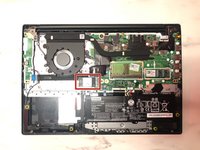
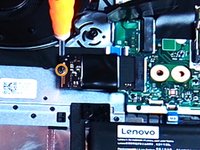
This guide will help to replace the SSD in your Lenovo IdeaPad 3-15IGL05. An SSD is a solid-state drive which is a storage device that use integrated circuits to store data persistently. Data is stored in memory cells within NAND flash chips. The SSD controller manages read/write operations and data distribution, so when your computer needs to access data, the controller quickly retrieves it from the appropriate cells. For writing data, the controller finds available cells and stores the information electronically.
The SSD is very important to your device's functionality so if your SSD is damaged or corrupt follow these directions to replace it. Overall, this replacement is straightforward and should be completed in a few simple steps if completed carefully and with precision. The tools you will need include iFixit opening tool, Phillips #0 screwdriver and Phillips PH000 screwdriver.
O que você precisa
-
-
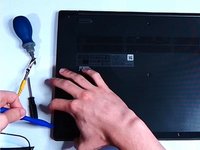
Use a Phillips #0 screwdriver to remove the ten 7.6 mm screws securing the bottom panel.
-





To reassemble your device, follow these instructions in reverse order.
Cancelar: não concluí este guia.
Uma outra pessoa concluiu este guia.



