Ir para o conteúdo principal
Participe da comunidade de reparos - Criar conta

LG env2 vx9100 Back Panel Replacement

O que você precisa

  1. LG env2 vx9100 Back Panel Replacement, Battery: passo 1, imagem 1 %32 LG env2 vx9100 Back Panel Replacement, Battery: passo 1, imagem 2 %32 LG env2 vx9100 Back Panel Replacement, Battery: passo 1, imagem 3 %32
    • Power off the phone before disassembly to avoid electric shock or fire.

    • Place the phone face down on the table.

    • Pull down the tab below the battery with your fingernail or an opening tool.

    • Lift the battery out.

    Pergunte ao FixBot
  2. LG env2 vx9100 Back Panel Replacement, Back Panel: passo 2, imagem 1 %32 LG env2 vx9100 Back Panel Replacement, Back Panel: passo 2, imagem 2 %32
    • Use a metal spudger to remove the five rubber covers and expose the screws underneath.

    Pergunte ao FixBot
  3. LG env2 vx9100 Back Panel Replacement: passo 3, imagem 1 %32 LG env2 vx9100 Back Panel Replacement: passo 3, imagem 2 %32
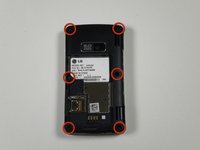
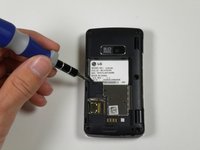
    • Remove all six 2.5 mm screws with a Phillips #00 screwdriver.

    Pergunte ao FixBot
  4. LG env2 vx9100 Back Panel Replacement: passo 4, imagem 1 %32 LG env2 vx9100 Back Panel Replacement: passo 4, imagem 2 %32
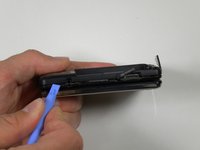
    • Insert a plastic opening tool into the seam and gently pry to release the tabs.

    • Work around the phone until all tabs are released.

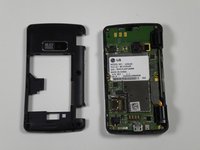
    • Remove the back panel.

    Pergunte ao FixBot
Conclusão

To reassemble your device, follow these instructions in reverse order.

2 outras pessoas executaram este guia.

Equipe

Cal Poly, Team 16-55, Forte Fall 2012 Membro de Cal Poly, Team 16-55, Forte Fall 2012

CPSU-FORTE-F12S16G55

5 Membros

Autoria de 14 guias

0Comentários do guia

Comentar

Visualizações:

Últimas 24 horas: 2

Últimos 7 dias: 6

Últimos 30 dias: 44

Ao todo: 1,074