Ir para o conteúdo principal
Participe da comunidade de reparos - Criar conta

LG Thrill 4G Speaker Replacement

O que você precisa

  1. LG Thrill 4G Speaker Replacement, Back Cover Removal: passo 1, imagem 1 %32 LG Thrill 4G Speaker Replacement, Back Cover Removal: passo 1, imagem 2 %32
    • Pry open the back cover by using a fingernail or a plastic opening tool.

    • There is a small notch at the bottom of the cover for easy removal.

    Pergunte ao FixBot
  2. LG Thrill 4G Speaker Replacement, Battery Removal: passo 2, imagem 1 %32 LG Thrill 4G Speaker Replacement, Battery Removal: passo 2, imagem 2 %32
    • Remove the battery from the phone.

    • There is a small ledge located at the bottom of the battery for easy removal.

    Pergunte ao FixBot
  3. LG Thrill 4G Speaker Replacement, Screw Removal: passo 3, imagem 1 %32
    • Remove the three Philips #00 screws from the bottom of the phone.

    • Two 5.5 mm screws

    • One 4 mm screw

    Pergunte ao FixBot
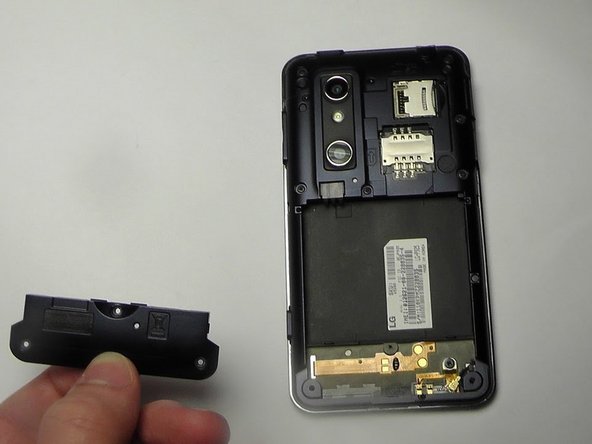
  4. LG Thrill 4G Speaker Replacement, Speaker Removal: passo 4, imagem 1 %32 LG Thrill 4G Speaker Replacement, Speaker Removal: passo 4, imagem 2 %32
    • Use your finger or opening tool to wedge the speaker out starting at the small notch at the bottom of the phone.

    Pergunte ao FixBot
Conclusão

To reassemble your device, follow these instructions in reverse order.

2 outras pessoas executaram este guia.

Kenny Richmond

Membro desde: 01/20/15

260 Reputação

Autoria de 2 guias

Equipe

USF Tampa, Team 1-6, Blackwell Winter 2015 Membro de USF Tampa, Team 1-6, Blackwell Winter 2015

USFT-BLACKWELL-W15S1G6

3 Membros

Autoria de 10 guias

0Comentários do guia

Comentar

Visualizações:

Últimas 24 horas: 0

Últimos 7 dias: 5

Últimos 30 dias: 50

Ao todo: 443